
From skill design to automation · Part 1/3
5 tasks · 4 documents generated · 1 email sent · 0 hallucinated data
This time we didn’t tell the AI how to do each thing. We gave it a spreadsheet with one task per row and a single instruction. From there, Microsoft Copilot Cowork mapped out a plan, read the documents in each folder, chose the right tool for each case, reordered the tasks when it detected a dependency, paused to ask permission before sending an email to the client, and when one approach failed, it didn’t pretend it had worked — it said so and found another way.
This first installment is for you to decide whether it deserves your attention. The next two show how it’s built (Part 2) and how it’s operated and governed (Part 3).
A chatbot delivers an answer. Cowork delivers a deliverable. That single difference rewrites what you can delegate.
From Answering to Executing: What Changes with Cowork
A conversational assistant gives you an answer. Copilot Cowork gives you a deliverable.
Asking a chatbot to draft a paragraph is answering. Picking up a task queue, reading the documents, deciding what to do with each one, producing the output, and leaving it ready for review is executing. Cowork belongs to the second group: it leverages Work IQ (your organization’s context) and orchestrates multiple capabilities to complete work within Microsoft 365, under your supervision.
The Case at a Glance: A Task List as the Engine Room
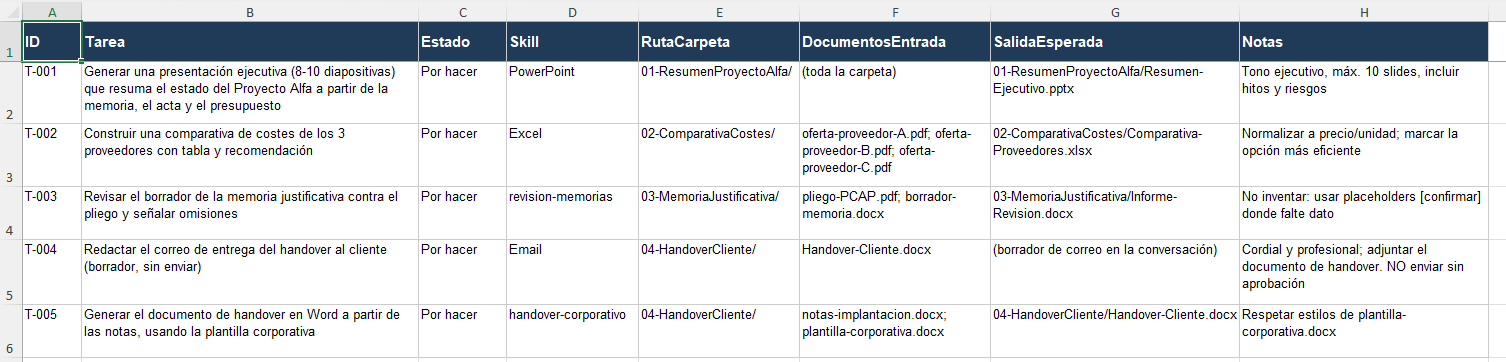
We set up an Excel workbook in a SharePoint library with one row per task: its status (To do / Done), the path to the folder containing the input documents, the skill to apply, and the expected deliverable. That board is the single source of truth — Cowork knows what to do, on what, and with which method, without us repeating it.

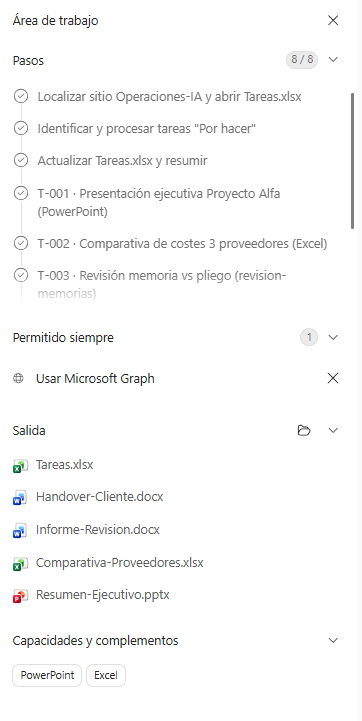
With a single instruction, Cowork opened the task list, processed the pending items, and displayed its workspace: the step-by-step plan, granted permissions, deliverables, and activated capabilities. The process is traceable, not a black box.

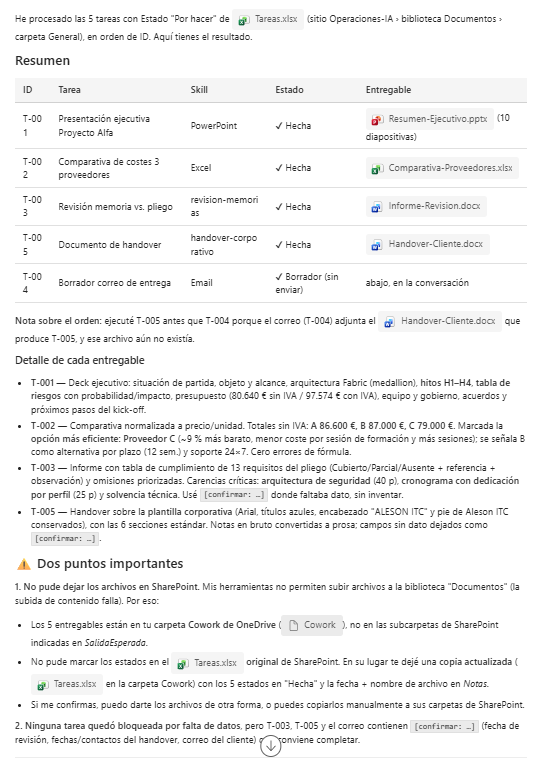
When it finished, it delivered a work summary: what it completed, which files it generated, and what remained pending.

The Honest Test: How It Handles What Goes Wrong
What builds the most trust isn’t what went right — it’s how it handled what didn’t.
When trying to deposit the deliverables into the SharePoint folders, Cowork hit a limitation: with the tools available in the tenant, uploading new files to the library wasn’t supported. Instead of assuming a non-existent success, it stated the issue clearly, stored the deliverables in Cowork’s OneDrive folder, and found an alternative route to update the status in the Excel task list.
A tool that acknowledges its own limits is a tool you can trust for real work.
The Business Case: What Work Fits and Who Notices
Cowork excels at repetitive, multi-step document work. That’s where it frees up business hours.
The following estimate is illustrative — actual savings depend on each organization and its volume — but it frames the order of magnitude. In every case, the person still reviews and approves: Cowork does the heavy lifting, not the decision-making.
| Type of work | Before (manual, approx.) | With Cowork (generate + review) |
|---|---|---|
| Executive presentation from multiple documents | 2–4 hrs | 15–30 min |
| Standardized bid comparison | 1–3 hrs | 10–20 min |
| Review of a technical report against the RFP | 2–5 hrs | 20–40 min |
| Handover document from notes + template | 1–2 hrs | 10–20 min |
| Draft delivery email with attachment | 15–30 min | 2–5 min |
The pattern is clear: the more structured and recurring the work, the greater the return. And since the method is captured in skills (we’ll cover this in Part 2), the output is consistent regardless of who runs it.
Which Teams Notice It First
- Pre-sales and proposals: generating proposals and executive summaries from scattered reports and data.
- Public procurement and tenders: reviewing technical reports against the RFP, tracking mandatory documentation and deadlines.
- PMO and technical office: meeting minutes, handovers, status reports, and project closure documentation.
- Procurement and finance: standardized bid and vendor comparisons, complete with recommendations.
- Document quality: aligning deliverables to corporate templates and style guidelines.
What’s Next in the Series
- Part 2/3 — From Skill Design to Orchestration: the normative
SKILL.mdformat, how to build custom skills, and the full prompt that kicks everything off. - Part 3/3 — From One-Off Execution to Governed Automation: scheduling, cost predictability, security, the adoption roadmap, and how we support it.
Attachments for This Series
This series comes with downloadable, ready-to-use materials: a task board template (Tareas-ejemplo.xlsx), two sample custom skills (SKILL.md), and the two full prompts (orchestration and scheduling). You’ll find them in the attachments folder that accompanies the publication.
Sources
- Copilot Cowork — Overview (Microsoft Learn)
- Copilot Cowork, General Availability (Microsoft 365 Blog, Jun. 2026)
- Enterprise Data Protection (EDP) in Microsoft 365 Copilot
How Aleson ITC Can Help You with Copilot Cowork
Automating document work with Copilot Cowork isn’t just a matter of activating a license. It requires designing the right skills for each workflow, preparing your SharePoint libraries with the correct structure, defining spending policies with Copilot Credits, and — above all — identifying which processes in your organization will deliver a real return versus which ones don’t justify the per-execution cost.
At Aleson ITC, we work with teams that already run on Microsoft 365 and need to make the leap from conversational AI to AI that executes. Whether you’re evaluating Cowork for the first time or need to govern a deployment that’s already underway, we support you at every stage:
- Use case identification with measurable ROI, prioritized by document volume and complexity.
- Custom skill design and development tailored to your organization’s workflows.
- Environment configuration: SharePoint libraries, spending policies, permissions, and governance.
- Integration with your data strategy: if you already work with Microsoft Fabric or Data Analytics solutions, Cowork becomes another piece of the ecosystem — not a separate silo.
- Security and compliance: deployment aligned with Zero Trust architectures and your organization’s data protection policies.
If you want to explore what Copilot Cowork can do for your teams, get in touch with us and we’ll assess it together.
FAQ — Frequently Asked Questions About Copilot Cowork
What is the difference between Copilot Chat and Copilot Cowork?
Copilot Chat answers questions, summarizes documents, and generates drafts within a conversation. Copilot Cowork goes a step further: it autonomously executes multi-step tasks — reading documents, producing deliverables, sending emails — within Microsoft 365 and under your supervision. The key difference is that Cowork returns completed work, not just a response.
What license do I need to use Copilot Cowork?
You need a Microsoft 365 Copilot license (the per-user subscription). On top of that, Cowork usage is billed separately through Copilot Credits on a pay-as-you-go model. The cost of each task depends on the model used, the context retrieved, the tool calls made, and the runtime.
What are skills in Copilot Cowork, and can I create my own?
Skills are structured instructions (in SKILL.md format) that define how Cowork should approach a specific type of task. Cowork ships with 13 built-in skills (Word, Excel, PowerPoint, PDF, Email, among others) and allows you to create up to 50 custom skills per tenant. In Part 2 of this series, we explain how to design and deploy them.
Is it safe to delegate sensitive work to Copilot Cowork?
Cowork operates within Microsoft 365’s existing security, compliance, and governance controls. Prompts, responses, and generated artifacts flow through the same protection mechanisms as the rest of your environment: audit logs, eDiscovery, Insider Risk Management, and sensitivity label inheritance. It’s off by default, and the admin decides who gets access and with what spending limit. If your organization needs to align the deployment with a Zero Trust security strategy, Aleson ITC can help.
What types of tasks deliver the best ROI when automated with Cowork?
Those that combine structure, repetition, and multiple document steps: generating proposals from scattered data, standardized bid comparisons, reviewing technical reports against RFPs, status reports, and handovers. The more predictable and recurring the workflow, the greater the time savings and the more consistent the output.
Can I integrate Copilot Cowork with Microsoft Fabric or Power BI?
Cowork operates within the Microsoft 365 ecosystem and can access data stored in SharePoint and OneDrive. As Microsoft expands its connectors (Dynamics 365, Databricks, and others are already on the roadmap), integration with data platforms like Microsoft Fabric becomes increasingly straightforward. If you need to design a workflow that connects Cowork with your Data Analytics strategy, that’s a scenario we support.