

From One-Off Runs to governed automation · Part 3/3
Governed automation is the natural destination for any workflow that already works well on demand. In Part 2 of this series, we built the flow with Copilot Cowork and ran it manually. In this third and final installment, we turn it into a daily, predictable, and auditable process, and map out the full path to rolling it out across your organization.
1. Scheduling: Let It Run on Its Own Every Day
Something that works once can work every morning without anyone triggering it. Turning the flow into a recurring task is as simple as describing the procedure and the frequency in a single prompt. Here is the complete scheduling prompt, used as-is during the pilot:
Schedule this task to run automatically every business day at
8:00 AM (Madrid time):

"In the 'Documents' library of the 'AI-Operations' site, open
'Tasks.xlsx' and RUN every row with Status = 'To Do', in ID
order:

- For each row, go to its FolderPath, use the indicated Skill
  on the documents, and generate the deliverable in
  ExpectedOutput, following the Notes.
- Mark each completed task as 'Done' with date and file name.
- Do NOT execute tasks that require a sensitive action (e.g.,
  sending an email) without approval: leave them as 'In
  Progress', prepare the draft, and flag it for my approval.
- If information is missing, leave the task as 'In Progress',
  note what is missing, and continue.

When finished, post me a daily summary: tasks completed,
deliverables, and items pending approval or data."
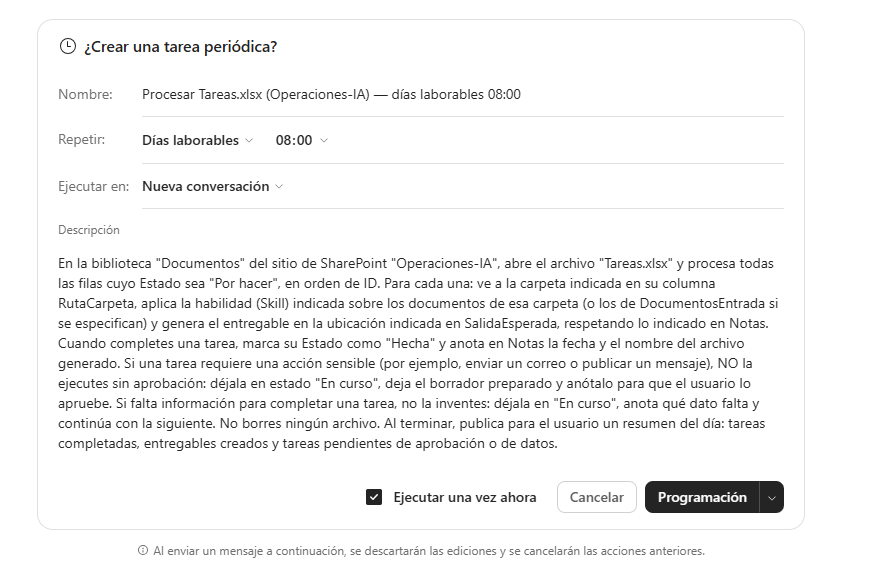
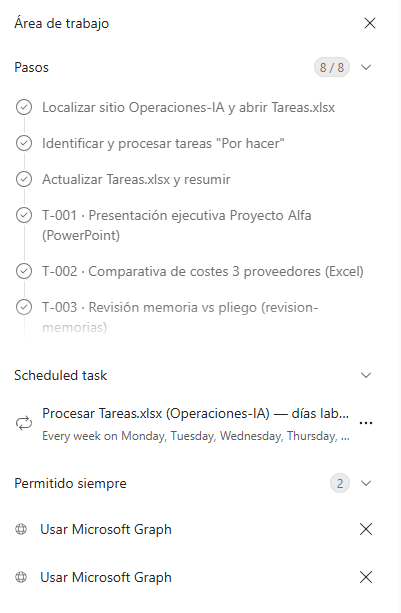
There’s an essential nuance here: even when scheduled, Cowork keeps a human approval step for sensitive actions. Whatever doesn’t require it — generating documents, updating the board — runs on its own; whatever does — sending an email — is prepared and left waiting. By design, it’s semi-automated: autonomy where it’s safe, oversight where it matters.
Automation isn’t about losing control. It’s about deciding in advance where you keep it.
2. Cost Predictability
Cowork is billed on usage, but that doesn’t mean the spend is unpredictable. It requires a Microsoft 365 Copilot license (USL), and consumption is billed separately through Copilot Credits. Two cost lines coexist: a fixed per-user fee (the USL) and a variable, usage-based cost (the tasks Cowork runs).
The cost of each task depends on four factors: the model used, context retrieval, tool calls, and execution time. To keep it under control:
- Set caps. Admins can set consumption limits per user or group from the Microsoft 365 admin center.
- Scope it tightly. Specific prompts and well-written skills reduce iterations; fewer round trips, lower cost.
- Schedule with judgment. Only schedule processes that truly recur; handle one-off work on demand.
- Monitor. Review consumption in the admin center dashboards and adjust as needed.
Recommendation: start with a small, bounded pilot to measure the real cost per task type in your environment before scaling. The billing model evolves quickly, so it’s worth checking current figures against Microsoft Learn’s official documentation.
3. Functional, Operational, and Security Considerations
Functional
- Works only with files in
OneDriveandSharePoint; never with local paths. - Can edit cells in an existing file, but uploading new files to the library may not be available depending on tools and configuration.
- Doesn’t delete files, doesn’t access encrypted content without the proper rights, and attachments are capped below 200 MB.
Operational
- Design where
Coworkwrites output and, if needed, usePower Automateto move final deliverables intoSharePoint. - Actions with consequences require approval, including in scheduled runs.
Security
- Operates within the Microsoft 365 boundary: respects identity and permissions, inherits
Purviewsensitivity and retention labels, and honors encryption. - It’s auditable (
Purview Audit,DLPfor Copilot,eDiscovery). Data isn’t used to train the base models. - The main risk is tenant oversharing: review permissions with
SharePoint Advanced ManagementandPurviewbefore scaling usage.
Note for European and public-sector environments: as of today, the Anthropic models used by Cowork are excluded from the EU Data Boundary and, where applicable, from in-country processing commitments. This doesn’t prevent their use, but it’s a factor worth weighing with the client and revisiting as the situation evolves; admins can enable or disable specific models.
4. What You Need to Get Started
| Step | Requirement |
|---|---|
| 1. License and billing | Microsoft 365 Copilot (USL) and usage-based billing enabled by the admin |
| 2. Activation | Cowork enabled for target users from the admin center |
| 3. Tenant readiness | Permissions and oversharing review across the sites and libraries involved |
| 4. Skills and data in place | Custom skills in /Documents/Cowork/skills/ and data in SharePoint |
| 5. Board and prompts | A task board and the orchestration and scheduling prompts |
5. The Adoption Journey
From pilot to governed use, in phases. Timelines are approximate:
| Phase | What Happens | Approximate Duration |
|---|---|---|
| 0 · Readiness | Readiness assessment: data governance, permissions/oversharing, licensing, and models | 1-2 weeks |
| 1 · First Skills + Pilot | 2-3 custom skills and a pilot board; validation with one team | 2-3 weeks |
| 2 · Flows and Scheduling | Orchestration, Power Automate integration, and scheduled execution |
2-4 weeks |
| 3 · Governance and Scale | Purview, cost control, training, and rollout to more teams |
Ongoing |
6. How Aleson ITC Supports You
Technology delivers when the environment is ready and the team knows how to steer it:
- Readiness assessment. We evaluate the tenant before delegating work to AI: data governance, permissions, oversharing, licensing, and costs.
- Skill design and development. We turn your own procedures — proposals, tender documents, reports, handovers — into reusable skills (
SKILL.md). - Automated and semi-automated flows. Boards as the single source of truth, scheduling and approvals, with
Power Automatecovering the stepsCoworkdoesn’t. - Governance, security, and compliance.
Microsoft Purview, access policies, and informed decisions on models and data residency. - Adoption and training. We train people to delegate well and review results.
The goal isn’t to replace teams. It’s to strengthen them: to free up their time for judgment, for clients, and for decision-making.
In One Sentence
Copilot Cowork doesn’t tidy your inbox: it plans and builds multi-step work, combining out-of-the-box capabilities, custom skills, and human oversight. Whoever learns to delegate to it well — and prepares the ground for it to do so — will hold an advantage that’s hard to match.
Sources
- Using Copilot Cowork — scheduling and approvals (Microsoft Learn)
- Security and governance — Copilot Control System (Microsoft Learn)
- Enterprise Data Protection (EDP) in Microsoft 365 Copilot
- Copilot Cowork, general availability (Microsoft 365 Blog, June 2026)
Copilot Cowork’s capabilities, limits, and billing model evolve quickly. Before committing to specific details with a client, it’s worth checking what’s currently in effect against Microsoft’s official Learn documentation.
How Aleson ITC Helps You Take This to Production
Getting here — a flow that works on demand with Copilot Cowork — is the visible part. What determines whether that flow is still alive six months later is the less glamorous work: data governance, tightly scoped permissions, and a cost model that doesn’t run away from you.
If you’re considering scheduling Cowork tasks across your organization, there are three questions worth answering before you scale: who actually has access to the SharePoint libraries involved, what sensitivity and retention labels does the content the AI will touch inherit, and what consumption caps make sense per team before opening the door to more users. At Aleson ITC, our Data Analytics and Microsoft Fabric services help bring order to the data and flows feeding these processes, while our Zero Trust Security service addresses exactly the oversharing risk and permissions review mentioned in the security section above.
If your tenant isn’t yet ready to delegate work to AI with confidence, a readiness assessment is the most sensible starting point before committing time and budget to scaling Cowork organization-wide.
Wondering if Copilot Cowork fits your organization? Get in touch with our team and schedule a readiness assessment session.
FAQ — Frequently Asked Questions About Copilot Cowork and Governed Automation
Can Copilot Cowork be scheduled to run automatically every day? Yes. Simply describe the procedure and frequency in a scheduling prompt (for example, every business day at a set time). Cowork runs the task on its own but still requires human approval for any sensitive action, such as sending an email.
How is Copilot Cowork usage billed? It requires a Microsoft 365 Copilot license (USL) plus a variable, usage-based cost billed through Copilot Credits. The spend depends on the model used, context retrieval, tool calls, and execution time for each task.
What is oversharing, and why is it Cowork’s main security risk? Oversharing happens when users or groups have access to more content than they should in SharePoint or OneDrive. Since Cowork operates with the user’s own permissions, undetected oversharing translates directly into improper access via the AI. It’s worth reviewing with SharePoint Advanced Management and Purview — something we cover in our Zero Trust Security service.
Can Copilot Cowork work with locally stored files? No. Cowork works exclusively with files in OneDrive and SharePoint; it doesn’t access local paths or encrypted content without the proper rights.
Is the data processed by Copilot Cowork used to train AI models? No. Microsoft states that data isn’t used to train the base models, and all activity is auditable through Purview Audit, DLP for Copilot, and eDiscovery.
How long does it take to go from a Copilot Cowork pilot to governed, organization-wide use? As a rough estimate, 5 to 9 weeks across three phases: readiness (1-2 weeks), first skills and pilot (2-3 weeks), and flows with scheduling (2-4 weeks); governance and scale are an ongoing process. A readiness assessment helps fine-tune these timelines to your actual tenant.