
Optimized Locking in SQL Server 2025 for Improving Your Database’s Concurrency
SQL Server 2025 introduces a long‑awaited improvement in concurrency management with Optimized Locking. This feature, previously available in Azure SQL Database, now arrives in SQL Server 2025, promising more efficient transaction handling without the need to modify existing code.
What is Optimized Locking?
Optimized Locking is an advanced technique for database lock management that reduces memory usage and improves concurrency between transactions.
To achieve this, it uses two key strategies: Transaction ID Locking and Lock After Qualification.
- Transaction ID Locking (TID Locking): Instead of locking every row modified by a transaction, SQL Server assigns a unique identifier (TID) to each transaction. The modified rows are tagged with this TID, and a single lock on the TID is used instead of multiple row-level locks. This reduces the number of required locks and improves overall performance.
- Lock After Qualification (LAQ): Under this approach, SQL Server evaluates query predicates using the most recently committed version of the row, without acquiring an initial lock. If the predicate is satisfied, an exclusive lock is then acquired to modify the row. This improves concurrency by avoiding unnecessary locks during the scan.
How does this benefit you?
The implementation of Optimized Locking provides several key benefits:
- Reduced memory consumption: By keeping fewer active locks, more memory is freed up for other operations.
- Improved concurrency: Transactions can run more simultaneously, increasing the system’s overall performance.
- Prevents lock escalation: By quickly releasing row locks, the likelihood of the system escalating locks to page or table level is reduced, improving scalability.
Requirements
To take full advantage of Optimized Locking in SQL Server 2025, several additional features need to be enabled:
- Accelerated Database Recovery (ADR): It must be enabled to use Optimized Locking.
- Read Committed Snapshot Isolation (RCSI): Enabling read committed snapshot isolation is recommended to obtain greater benefits from Optimized Locking, since the Lock After Qualification technique only works if RCSI is enabled.
How to enable Optimized Locking?
Once these requirements are met, Optimized Locking can be enabled at the database level using the following SQL command:
ALTER DATABASE [DatabaseName] SET OPTIMIZED_LOCKING = ON;
To verify whether Optimized Locking is enabled:
SELECT DATABASEPROPERTYEX([DatabaseName], 'IsOptimizedLockingOn');
or
SELECT name, is_memory_optimized_enabled, is_optimized_locking_on

FROM sys.databases

WHERE name = ‘DatabaseName;

GO
Demonstration of how it works.
We select our database:

We check the current status of optimized locking:
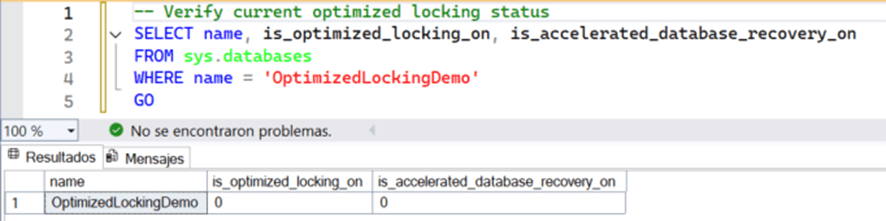
We execute several updates at the same time on the same table:
BEGIN TRANSACTION;
    UPDATE Products
    SET Stock = Stock - 1
    WHERE ProductID = 1;
    WAITFOR DELAY '00:00:05';
COMMIT TRANSACTION;
GO
We check the locks:

And we view the wait time statistics related to object locks.
SELECT
    wait_type AS WaitType,
    waiting_tasks_count AS TasksWaiting,
    wait_time_ms AS WaitTimeMS,
    max_wait_time_ms AS MaxWaitTimeMS,
    signal_wait_time_ms AS WaitTimeSignalMS
FROM sys.dm_os_wait_stats
WHERE wait_type LIKE 'LCK%'
ORDER BY wait_time_ms DESC;
GO
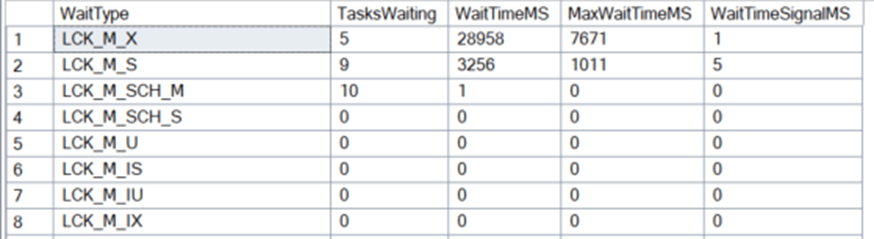
Now we are going to enable optimized locking on the database.
To enable optimized locking, ADR must be enabled.
ALTER DATABASE OptimizedLockingDemo
SET OPTIMIZED_LOCKING = ON;
GO
We check the status of optimized locking after the change:
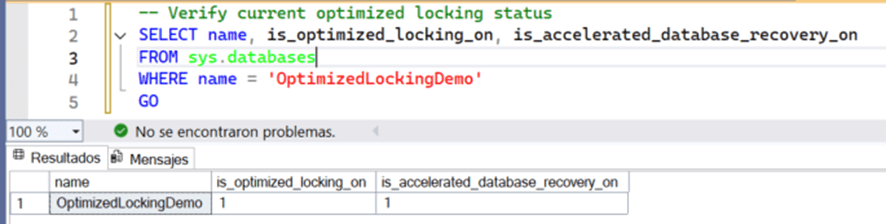
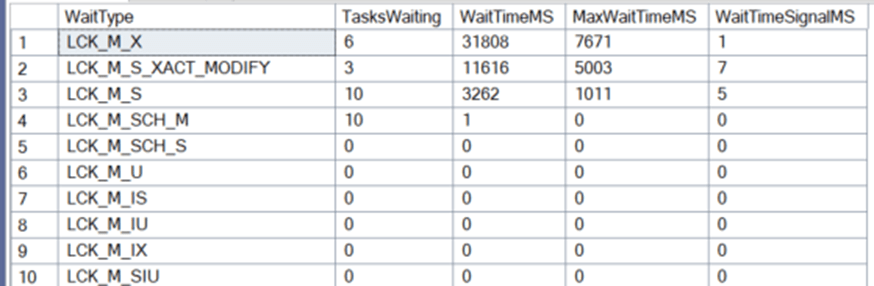
We execute several updates at the same time on the same table:
BEGIN TRANSACTION;
    UPDATE Products
    SET Stock = Stock - 1
    WHERE ProductID = 1;
    WAITFOR DELAY '00:00:05';
COMMIT TRANSACTION;
GO
We check the locks:

And we view the wait time statistics related to object locks.
Comparison with the Traditional Locking Model
Before the introduction of optimized locking, SQL Server used a traditional locking model based on creating explicit locks on rows, pages, or tables. This approach led to several issues:
- Lock escalation: When a query locks many rows, SQL Server may escalate those locks to the page or table level, affecting access to non‑conflicting data.
- High memory consumption: Each lock consumes memory, which impacts performance in high‑concurrency environments.
- Contention: Read and write operations on records shared by multiple transactions create conflicts, increasing wait times and reducing performance.
- Limited scalability: In high‑concurrency environments—such as e‑commerce or social media databases—bottlenecks become a significant issue.
With optimized locking, SQL Server addresses these issues by using more efficient techniques to manage transactions.
Although transaction logic and isolation levels remain the same (for example, READ COMMITTED and SNAPSHOT), SQL Server’s internal behavior has significantly improved.
The performance improvements are most noticeable in high‑concurrency scenarios such as:
- Bulk data loads.
- ETL processes handling large volumes of data.
- UPDATE/DELETE queries with complex conditions.
- Systems where multiple users are simultaneously modifying large amounts of data.
Conclusion:
Optimized Locking in SQL Server 2025 represents a fundamental improvement in the way SQL Server manages database concurrency and performance. This functionality enables greater efficiency and scalability without sacrificing data integrity or requiring changes to existing code.
By reducing unnecessary locks and improving the management of system resources, optimized locking opens the door to faster and more scalable databases, particularly in high‑concurrency environments.
Other Sources
- Bloqueo optimizado – SQL Server | Microsoft Learn
- What’s New in SQL Server 2025 – Brent Ozar Unlimited®
- SQL Server 2025: Optimized Locking—A Game Changer for Concurrency and Scalability
- What’s new in SQL Server 2025 – Microsoft Tech Community
- How Optimized Locking in SQL Server 2025 handles concurrent updates | by Sergio Govoni | CodeX | Medium
Articles in the SQL Server 2025 Series
- Part 1: All the new features in SQL Server 2025
- Part 2: Optimized Locking in SQL Server 2025
- Part 3: New ZSTD backup compression algorithm for SQL Server 2025
- Part 4: Change Event Streaming (CES) in SQL Server 2025
- Part 5: SQL Server 2025 improves JSON performance with indexes and new functions
- Part 6: Vector Search in SQL Server 2025: VECTOR data type and DiskANN
- Part 7: How to use regular expressions (REGEX) in SQL Server 2025
- Part 8: New in Intelligent Query Processing in SQL Server 2025
- Part 9: All New Features in SQL Server Management Studio 22
- Part 10: Data API Builder for Azure Databases

Data Engineer with experience in SQL Server. Microsoft Azure Database Administrator Associate and Azure Administrator Associate Certified I focus on database performance improvement and monitornig.