
TLS Changes in Azure SQL: Goodbye to TLS 1.0, 1.1 and the “No Minimum TLS” Setting
If you manage databases on Azure SQL Database or Azure SQL Managed Instance, you’ll want to pay attention to this one. Microsoft has announced two major TLS changes that directly impact the security and connectivity of your cloud databases:
- The definitive retirement of TLS 1.0 and TLS 1.1 across all Azure database services.
- The removal of the “No Minimum TLS” (MinTLS = None) option, which allowed servers to accept connections using any TLS version — including unencrypted ones.
If you haven’t checked your configuration yet, you could be facing unexpected connection failures. Let’s dive in.
What exactly has changed? TLS changes timeline for Azure SQL
| Date | Change |
|---|---|
| November 2024 | Setting minimum TLS below 1.2 is no longer possible from the Azure portal. |
| August 31, 2025 | TLS 1.0 and 1.1 officially retired. Microsoft force-upgrades servers to TLS 1.2. Connections using TLS 1.0 or 1.1 stop working. |
| July 15, 2026 | MinTLS = None option removed for new resources via PowerShell, CLI, and REST API. Existing servers with MinTLS = None are automatically upgraded to TLS 1.2. |
These changes affect Azure SQL Database, Azure SQL Managed Instance, Cosmos DB, and Azure Database for MySQL. They do not affect SQL Server on-premises or SQL Server on Azure VMs, where TLS is managed at the OS level.
What is MinTLS = None and why is it being removed?
MinTLS = None (or MinTLS = “0”) was the default setting on many Azure SQL servers. It meant the server accepted connections using any TLS version, including unencrypted ones. With TLS 1.0 and 1.1 now retired, keeping this option around no longer makes sense.
Starting July 15, 2026:
- Creating a server with
MinTLS = Nonevia PowerShell, CLI, or REST API will return anInvalid operationerror. - Downgrades to None will be blocked.
- If you leave the parameter blank, it will default to TLS 1.2.
- Existing servers with MinTLS = None will be automatically upgraded to TLS 1.2.
How to check and update TLS settings on your Azure SQL server
Check your current configuration
# Azure SQL Database
(Get-AzSqlServer -ServerName "server-name" -ResourceGroupName "resource-group").MinimalTlsVersion

# Azure SQL Managed Instance
(Get-AzSqlInstance -Name "instance-name" -ResourceGroupName "resource-group").MinimalTlsVersion
If the result is empty, None, or 0, your server will be affected by these changes.
Update to TLS 1.2
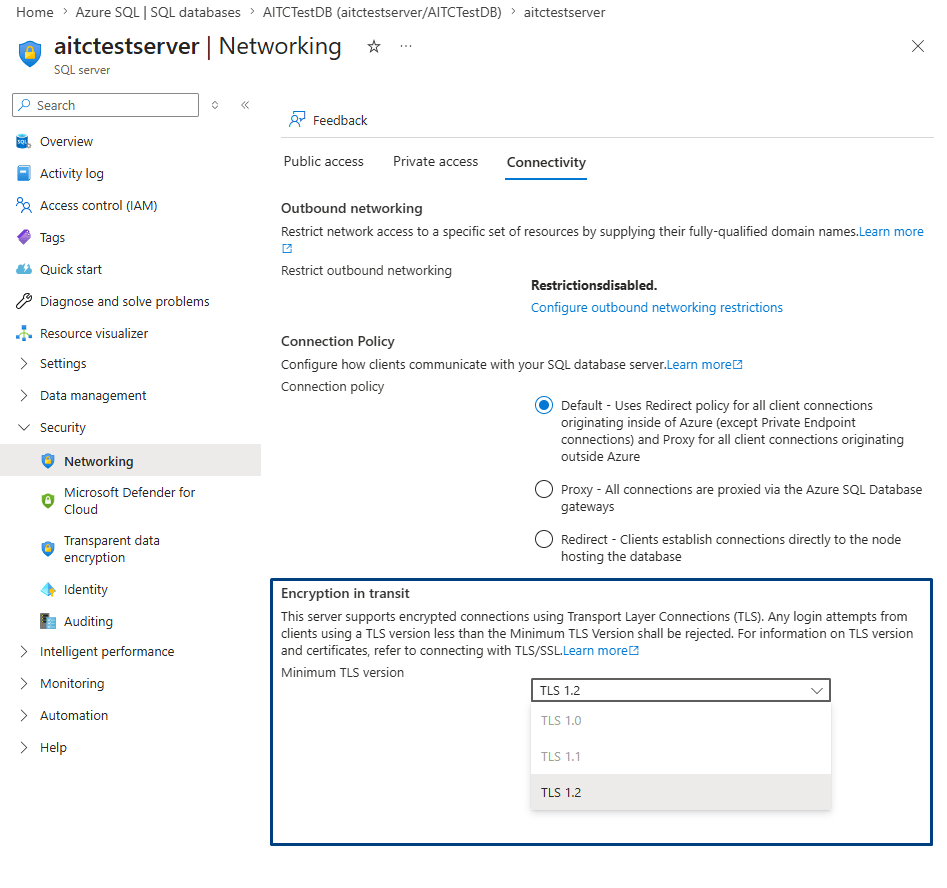
From the Azure portal: navigate to your logical server → Security → Networking → Connectivity tab → select TLS 1.2 from the dropdown → Save.
Using PowerShell:
# Azure SQL Database
Set-AzSqlServer -ServerName "server-name" -ResourceGroupName "resource-group" -MinimalTlsVersion "1.2"

# Azure SQL Managed Instance
Set-AzSqlInstance -Name "instance-name" -ResourceGroupName "resource-group" -MinimalTlsVersion "1.2"
Heads up: once you set TLS 1.2 as the minimum, you can’t revert it. Make sure all your clients are compatible first.
How to identify clients connecting with TLS 1.0 or 1.1
Before enforcing TLS 1.2, the responsible thing to do is verify that no legacy application is still connecting with outdated versions. You’ll need SQL Auditing enabled. Once it’s active, you can run this query in Log Analytics:
AzureDiagnostics
| where Category == "SQLSecurityAuditEvents"
| where client_tls_version_name_s in ("1.0", "1.1")
| project TimeGenerated, client_tls_version_name_s, server_principal_name_s, client_ip_s, database_name_s
| order by TimeGenerated desc
You can also query sys.fn_get_audit_file directly via T-SQL if you have access to the audit files, or check the portal metrics by splitting successful connections by TLS version.
For Managed Instance, auditing TLS versions requires setting up Extended Events with an Azure storage account. It takes more effort, but it’s the only reliable method.
Quick checklist before July 15, 2026
- ✅ Check the MinTLS setting on all your Azure SQL servers.
- ✅ Enable SQL Auditing and review logs for connections using legacy TLS.
- ✅ Identify and update your application drivers (JDBC, ODBC, .NET, etc.).
- ✅ Explicitly set TLS 1.2 as the minimum version.
- ✅ Review your IaC scripts (Terraform, Bicep, ARM) to ensure they don’t create resources with MinTLS = None.
- ✅ Test in a staging environment before applying changes to production.
When the checklist isn’t enough
If you’re running one server with a couple of databases, everything in this post is more than enough. But if you’re managing dozens or hundreds of servers without a centralized inventory of TLS settings, auditing isn’t enabled everywhere, or you simply don’t have a dedicated DBA who can take on this review on top of their daily workload — that’s a different story.
This is exactly the kind of scenario where an SQL Server Health Check from Aleson ITC makes a real difference. Our team of certified consultants audits your entire environment — security configuration (including TLS), performance, high availability, and best practices — with 3 to 10 days of monitoring and a documented action plan.
And if you need ongoing support, our DBA as a Service covers exactly that: monthly support with response times under 1 hour.
👉 Get in touch or request your Health Check.
FAQ — Frequently asked questions about TLS in Azure SQL
Can I still use TLS 1.0 or 1.1 with Azure SQL?
No. As of August 31, 2025, Microsoft retired support for TLS 1.0 and 1.1. Connections using these versions will fail, and servers were force-upgraded to TLS 1.2.
Does Azure SQL Database support TLS 1.3?
Yes, Azure SQL supports TLS 1.3 connections when using TDS 8.0. However, you can’t enforce TLS 1.3 as the minimum version — the lowest configurable value is TLS 1.2, and the server will accept both 1.2 and 1.3.
How can I tell if my applications are using outdated TLS?
By enabling SQL Auditing and querying the logs in Log Analytics or via sys.fn_get_audit_file. At Aleson ITC, this connectivity analysis is part of our SQL Server Health Check service.
What if my IaC scripts create servers with MinTLS = None?
Starting July 15, 2026, they’ll fail with an Invalid operation error. Update your templates to set minimalTlsVersion to "1.2" or leave it unspecified (the default will be 1.2).

Working with data technologies since 2008, my main expertise is in SQL Server but I work well as a Data Engineer in Azure Data and in all kinds of databases. Since 2015 I work at Aleson ITC, a company where I am the CTO and also a shareholder.