
Variables in Microsoft Fabric: Multi-Environment Setup
Variable Management in Microsoft Fabric: Parametrization and Multi-Environment Deployment
In many Microsoft Fabric projects, the main challenge is not data ingestion — it is parametrization and configuration standardization. When teams work across multiple environments, shared lakehouses, and pipelines that must remain consistent from development through to production, the absence of a clear variable management strategy generates costly technical debt and hard-to-trace errors.
This article shows how to solve that problem with a proven pattern: Variable Library as a central configuration layer, dynamic access to OneLake, and controlled deployments with Deployment Pipelines.
The Parametrization Challenge in Multi-Environment Projects
The most common problems arise when a project involves:
- Multiple environments (DEV / TEST / PROD), each with its own resources, permissions, connections, and configuration parameters.
- Different lakehouses and pipelines that share common logic but point to different sources and destinations depending on the environment.
- Distributed teams that need a shared reference to avoid inconsistencies across development, testing, and production layers.
Without a parametrization strategy, notebooks end up with hardcoded values: paths, IDs, table names, and connection strings written directly into the code. The result is a fragile development cycle where every artifact promotion between environments requires manual intervention and opens the door to mistakes.
A robust solution must enable:
- Eliminating hardcodes for paths, IDs, table names, and connections, reducing errors when moving artifacts between environments.
- Reusing notebooks as generic processing units where the logic stays stable and only the configuration values change.
- Supporting safe, repeatable deployments, especially in projects that rely on Deployment Pipelines or ALM processes.
Solution Architecture
1. Variable Library as a Configuration Layer
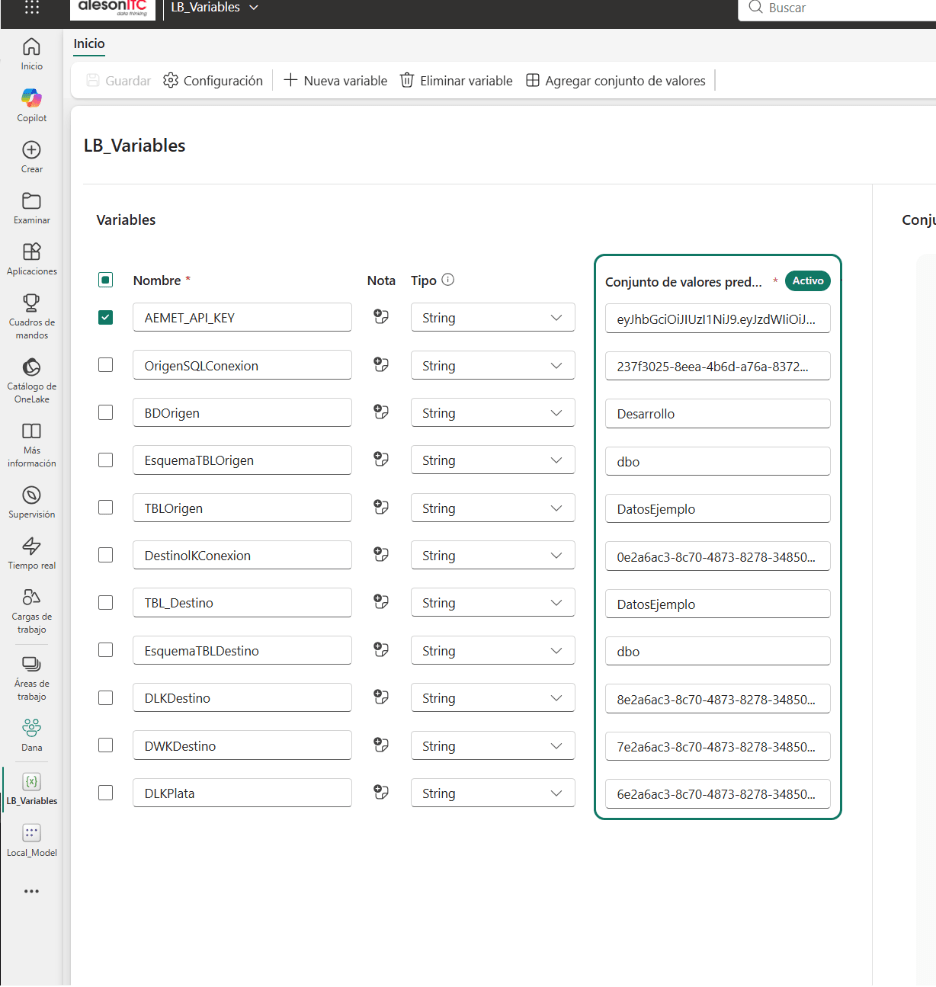
The foundation of this approach is a centralized variable library — referred to here as LB_Variables — that acts as a single source of truth for all project parameters. It stores:
- Lakehouse IDs, preventing notebooks from depending on identifiers written directly in the code.
- Source and destination data connections, swappable per environment without touching the processing logic.
- Table and schema names, standardizing naming conventions and reducing cross-layer inconsistencies.
- APIs and technical parameters: endpoints, base paths, workspace names, or process-specific settings.
This pattern delivers three core benefits:
- Separation of configuration and logic: the notebook focuses on transforming data, not on managing infrastructure-specific values.
- Environment switching without code changes: simply update the values defined in the corresponding environment’s Variable Library.
- Centralized governance: simplifies reviews, auditing, and maintenance as the project scales.
Using the Variable Library in a Notebook
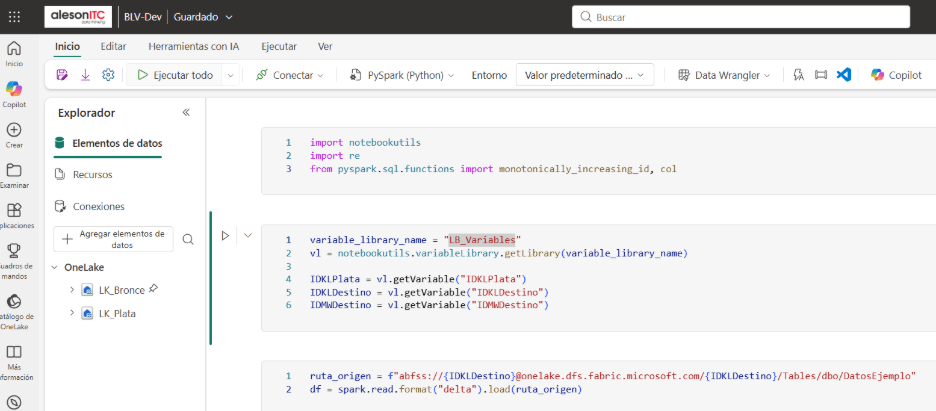
The notebook stops relying on hardcoded values and instead reads them from the Variable Library. The variable_library_name variable defines the name of the project’s library; getLibrary loads it into memory for use during execution.
variable_library_name = "LB_Variables"
vl = notebookutils.variableLibrary.getLibrary(variable_library_name)
IDKLDestino = vl.getVariable("IDKLDestino")
getVariable("IDKLDestino") retrieves the destination lakehouse identifier. This value can differ across DEV, TEST, and PROD, but the notebook will always execute exactly the same logic. When promoting the artifact between environments, only the Variable Library configuration changes — the notebook code never does.
The key advantage is that the notebook becomes more reusable, maintainable, and safe for multi-environment deployments, eliminating the risk of pointing to the wrong lakehouse or having to manually update paths and identifiers on every deployment.
2. Dynamic Access to OneLake
Using the retrieved variables, dynamic paths are built at runtime to resolve the correct destination lakehouse or table:
source_path = f"abfss://{IDKLDestino}@onelake.dfs.fabric.microsoft.com/{IDKLDestino}/Tables/dbo/SampleData"
This pattern prevents the most common problems caused by hardcoded paths:
- In Power BI, path or table name changes can break published semantic models and reports.
- In SQL, queries that depend on specific schema, table, or data layer names become fragile whenever anything is renamed.
- In semantic modeling, consistency in names and structures is critical to keeping measures, relationships, and documentation aligned.
The same pattern applies directly to multiple load, transformation, or validation processes, scaling the pipeline without duplicating code or logic.
CI/CD with Deployment Pipelines
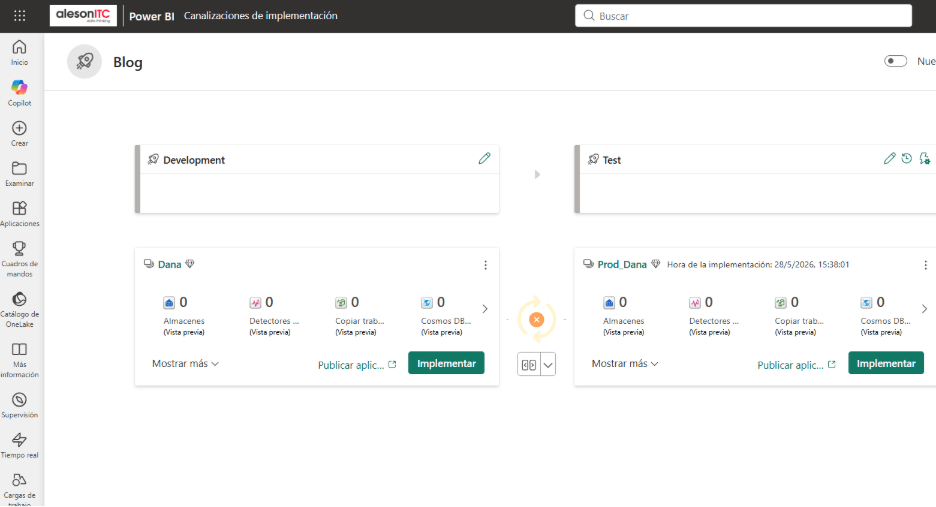
The solution is completed by integrating Deployment Pipelines to manage the full artifact lifecycle:
- Development → Test → Production: an ordered flow where every change is validated before reaching the production environment.
- Controlled artifact promotion: eliminates untracked, manual movement of notebooks, pipelines, or lakehouses.
- True environment separation: differentiated configurations, permissions, and data to reduce operational risk.
Variable management is what makes this flow work cleanly:
- Each environment holds its own values, so artifacts point to distinct resources without the need to duplicate notebooks or pipelines.
- The code does not change between environments, reducing the risk of introducing manual errors during deployment.
- The promotion process is traceable and auditable, because business logic and configuration are clearly separated.
Key Best Practices
- Centralize variables from the start to avoid costly refactoring once the project already has several notebooks or pipelines running.
- Never hardcode IDs or paths, especially in processes intended to be deployed across multiple environments or reused by different teams.
- Design notebooks with multi-environment in mind: separate parameters, business logic, and validations from the very first design.
- Integrate ALM from day one so that environment promotion is a natural part of the development cycle, not a last-minute manual task.
Is Your Team Running Microsoft Fabric in Production?
Properly managing variables and multi-environment deployments in Microsoft Fabric requires deliberate design effort and experience with ALM patterns. If your team is scaling data projects in Fabric — or migrating from Databricks, Azure Synapse, or on-premises environments — and needs to establish a solid architecture from the ground up, Aleson ITC can help.
As a Microsoft ecosystem technology partner, we support data teams in designing, implementing, and operating solutions on Microsoft Fabric, from ingestion through semantic modeling and Power BI report delivery.
Our Data Analytics and Microsoft Fabric services cover:
- Lakehouse architecture and multi-environment pipeline design.
- ALM pattern implementation with Deployment Pipelines.
- Migration and modernization from legacy data platforms.
- Technical training and hands-on support for in-house teams.
If your project is growing and environment management is becoming a bottleneck, talk to our team. We assess your situation with no commitment and propose a concrete path toward a more robust and maintainable data architecture.
FAQ — Frequently Asked Questions About Variable Management in Microsoft Fabric
What is the Variable Library in Microsoft Fabric and what is it used for?
The Variable Library is a Microsoft Fabric component that allows you to centralize configuration parameters — such as lakehouse IDs, paths, table names, or connection credentials — outside of the notebook code. Its main purpose is to separate configuration from processing logic, making it straightforward to deploy across DEV, TEST, and PROD without modifying any code between environments.
How do you access a Variable Library from a notebook in Microsoft Fabric?
You use the notebookutils.variableLibrary object. getLibrary("library_name") loads the library into memory, and getVariable("variable_name") retrieves each parameter’s value. This pattern allows the same notebook to run correctly across different environments simply by swapping the Variable Library configured for each one.
How do you build dynamic paths to OneLake to avoid hardcoding?
Using values retrieved from the Variable Library, you construct abfss:// paths with Python f-strings: f"abfss://{IDKLDestino}@onelake.dfs.fabric.microsoft.com/{IDKLDestino}/Tables/dbo/TableName". This lets the same line of code point to the correct lakehouse in every environment without any manual changes.
What are Deployment Pipelines in Microsoft Fabric and how do they integrate with variables?
Deployment Pipelines are Fabric’s native ALM tool for managing the lifecycle of artifacts — notebooks, pipelines, lakehouses, and semantic models — across DEV, TEST, and PROD environments. When combined with a per-environment Variable Library strategy, artifact promotion becomes fully controlled: the code never changes, only the target environment’s configuration values are updated.
What issues does proper notebook parametrization prevent in Microsoft Fabric?
It prevents the most common data project errors: pointing to the wrong lakehouse during environment promotion, duplicating notebooks for each environment, breaking Power BI semantic models due to path changes, and losing deployment traceability. Good parametrization makes projects safer, more maintainable, and easier to scale over time.
When does it make sense to bring in external expertise for Microsoft Fabric architecture?
When the project scales beyond a small team, when more than one environment needs to be managed simultaneously, or when the organization requires quality assurance, governance, and operational continuity guarantees.
In those cases, working with a Microsoft Fabric specialist partner like Aleson ITC can accelerate delivery timelines and reduce the technical risk of the project.

Business Intelligence Senior Consultant.