
SQL Server 2025 improves JSON performance with indexes and new functions
Evolution of JSON support in SQL Server
Since SQL Server 2016, Microsoft introduced support for JSON data, allowing developers to store and query semi-structured information within relational databases. However, until now, working with large volumes of JSON data could be complex and costly in terms of performance. SQL Server 2025 radically changes this landscape by incorporating significant improvements that make JSON much more manageable.
JSON limitations in previous versions
In previous versions of SQL Server, handling JSON was complex, as indexing data required creating computed columns that extracted specific values from the document. This increased design and maintenance complexity, forced teams to anticipate which fields would be queried most frequently, and caused performance issues with large data volumes, including high CPU usage and long response times. These limitations led many teams to adopt hybrid architectures with NoSQL databases, increasing infrastructure complexity.
What’s new in SQL Server 2025 for JSON data
SQL Server 2025 represents a significant step forward by allowing native indexes directly on JSON fields, eliminating the need for computed columns. This simplifies table design, reduces the risk of inconsistencies, and significantly improves query performance, making intensive JSON usage viable in high-concurrency scenarios and positioning the platform as a solid option for modern applications with flexible schemas.
Let’s put it to the test.
Practical example
First, we are going to create the table where we will run the tests.
CREATE TABLE [HumanResources].[EmployeeJsonText](
  [BusinessEntityID] [int] NOT NULL,
  [NationalIDNumber] [nvarchar](15) NOT NULL,
  [LoginID] [nvarchar](256) NOT NULL,
  [OrganizationNode] [hierarchyid] NULL,
  [OrganizationLevel]  AS ([OrganizationNode].[GetLevel]()),
  [JobTitle] [nvarchar](50) NOT NULL,
  [BirthDate] [date] NOT NULL,
  [MaritalStatus] [nchar](1) NOT NULL,
  [Gender] [nchar](1) NOT NULL,
  [HireDate] [date] NOT NULL,
  [SalariedFlag] [dbo].[Flag] NOT NULL,
  [VacationHours] [smallint] NOT NULL,
  [SickLeaveHours] [smallint] NOT NULL,
  [CurrentFlag] [dbo].[Flag] NOT NULL,
  [rowguid] [uniqueidentifier] ROWGUIDCOL  NOT NULL,
  [ModifiedDate] [datetime] NOT NULL,
  JsonData JSON);
Then, we will create another identical table, which we will later index to observe the difference.
CREATE TABLE [HumanResources].[EmployeeJsonText_Indexed](
  [BusinessEntityID] [int] NOT NULL,
  [NationalIDNumber] [nvarchar](15) NOT NULL,
  [LoginID] [nvarchar](256) NOT NULL,
  [OrganizationNode] [hierarchyid] NULL,
  [OrganizationLevel]  AS ([OrganizationNode].[GetLevel]()),
  [JobTitle] [nvarchar](50) NOT NULL,
  [BirthDate] [date] NOT NULL,
  [MaritalStatus] [nchar](1) NOT NULL,
  [Gender] [nchar](1) NOT NULL,
  [HireDate] [date] NOT NULL,
  [SalariedFlag] [dbo].[Flag] NOT NULL,
  [VacationHours] [smallint] NOT NULL,
  [SickLeaveHours] [smallint] NOT NULL,
  [CurrentFlag] [dbo].[Flag] NOT NULL,
  [rowguid] [uniqueidentifier] ROWGUIDCOL  NOT NULL,
  [ModifiedDate] [datetime] NOT NULL,
  JsonData JSON);
Next, we will insert data from an existing table into the two new tables we have just created. To avoid repeating the entire script, if you want to recreate it, first run the following snippet exactly as is, and then change the table name in the INSERT from EmployeeJsonText to EmployeeJsonText_Indexed and run it again.
INSERT INTO [HumanResources].[EmployeeJsonText](
     [BusinessEntityID]
      ,[NationalIDNumber]
      ,[LoginID]
      ,[OrganizationNode]
      ,[JobTitle]
      ,[BirthDate]
      ,[MaritalStatus]
      ,[Gender]
      ,[HireDate]
      ,[SalariedFlag]
      ,[VacationHours]
      ,[SickLeaveHours]
      ,[CurrentFlag]
      ,[rowguid]
      ,[ModifiedDate]
    ,JsonData)
SELECT
    BusinessEntityID
      ,NationalIDNumber
      ,LoginID
      ,OrganizationNode
      ,JobTitle
      ,BirthDate
      ,MaritalStatus
      ,Gender
      ,HireDate
      ,SalariedFlag
      ,VacationHours
      ,SickLeaveHours
      ,CurrentFlag
      ,rowguid
      ,ModifiedDate
    ,(
    SELECT
         BusinessEntityID as [BusinessEntityID]
      ,NationalIDNumber as [NationalIDNumber]
      ,LoginID as [LoginID]
      ,OrganizationNode as [OrganizationNode]
      ,JobTitle as [JobTitle]
      ,BirthDate as [BirthDate]
      ,MaritalStatus as [MaritalStatus]
      ,Gender as [Gender]
      ,HireDate as [HireDate]
      ,SalariedFlag as [SalariedFlag]
      ,VacationHours as [VacationHours]
      ,SickLeaveHours as [SickLeaveHours]
      ,CurrentFlag as [CurrentFlag]
      ,rowguid as [rowguid]
      ,ModifiedDate as [ModifiedDate]
    FOR JSON PATH, WITHOUT_ARRAY_WRAPPER
    ) myjson
FROM AdventureWorks2025.HumanResources.Employee;
GO
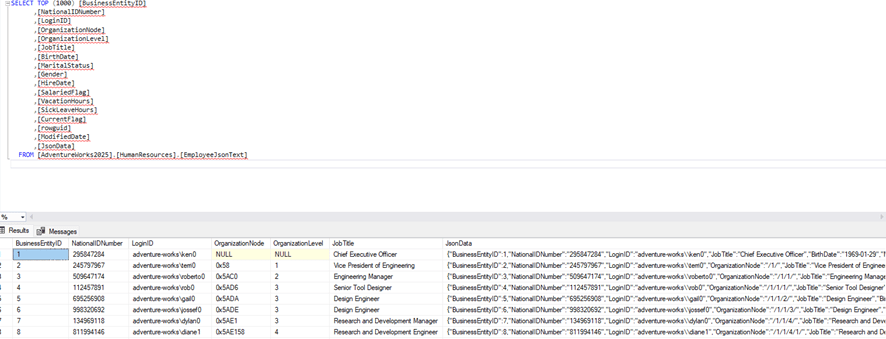
When inserting the data, we should see that the JsonData field appears as shown in the following image:
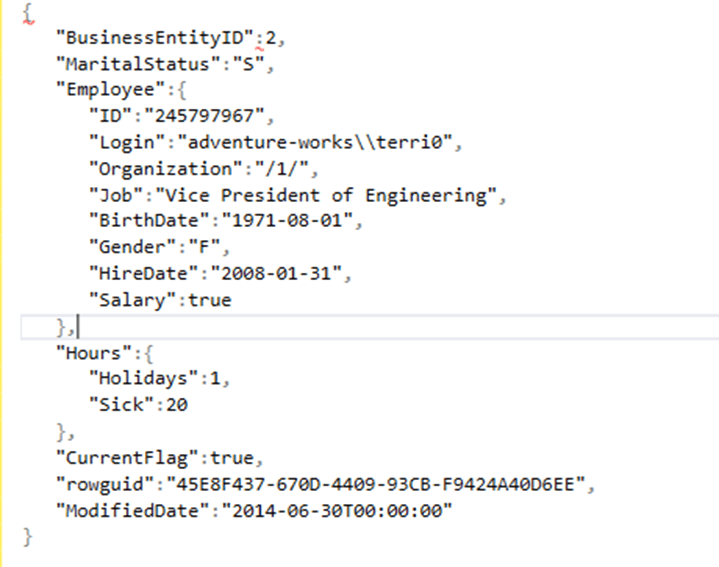
If we take a closer look and parse it, we should see a similar format:
And we create the index on the JsonData field:
CREATE JSON INDEX ix_json ON HumanResources.EmployeeJsonText_Indexed(JsonData) FOR ('$.Employee.ID', '$.Employee.BirthDate', '$.Hours.Holidays');
Afterwards, we run both queries to observe the differences in the execution engine:
SET STATISTICS IO ON;

SELECT LoginID
FROM [HumanResources].[EmployeeJsonText]
WHERE JSON_CONTAINS(JsonData,'295847284','$.Employee.ID') = 1;

SELECT LoginID
FROM [HumanResources].[EmployeeJsonText_Indexed]
WHERE JSON_CONTAINS(JsonData,'295847284','$.Employee.ID') = 1;

After reviewing this result, we can state the following:
- Even though it has an index, it performs a table scan.
- Reads have been optimized from 32 logical reads down to 3.
But why does it perform a scan if there is an index on that field?
Let’s take a look at how this JSON-type “index” is stored.
When running the following query, we can see that it is stored as an internal table:
SELECT * FROM sys.objects
WHERE name LIKE '%json%'

This is the reason why it performs a scan instead of the seek we always aim for to fully optimize a query using a conventional index.
Performance benefits in SQL Server 2025
Los beneficios de rendimiento que aporta SQL Server 2025 en el tratamiento de datos JSON son uno de loThe performance benefits provided by SQL Server 2025 when handling JSON data are one of the highlights of this version. Preliminary tests conducted by Microsoft, together with early user experiences, show that queries on information stored in JSON format can be up to ten times faster compared to previous versions. This increase in speed is mainly due to the introduction of native indexes on JSON fields and internal optimizations of query functions, allowing much more direct and efficient data access.
In short, working with JSON in SQL Server 2025 is no longer a trade-off between flexibility and efficiency. It is now possible to take advantage of rich semi-structured data without sacrificing performance or increasing database administration complexity, opening the door to simpler, more powerful architectures aligned with the needs of modern applications.
Practical use cases for JSON in SQL Server
Native JSON support with indexes opens up a wide range of possibilities for developers and data analysts. Some scenarios include:
- Modern applications: Systems that store semi-structured data such as user configurations, event logs, or sensor information can now be queried directly from SQL Server quickly.
- Real-time queries: SQL Server 2025 allows searching specific JSON attributes in real time, ideal for analytical dashboards or applications with high read frequency.
- Hybrid Relational + NoSQL storage: Organizations looking to consolidate structured and semi-structured data can keep everything within SQL Server without sacrificing performance or flexibility.
- AI and advanced analytics: Structured JSON data can be directly integrated with artificial intelligence and machine learning models, delivering real-time predictions and analytics without the need for complex ETL processes.
Conclusión
With these capabilities, SQL Server ceases to be just a relational data store and becomes a hybrid platform capable of handling structured, semi-structured data, and advanced analytics.
For organizations that rely on modern applications, real-time analytics, or AI integration, SQL Server 2025 offers a more flexible, faster, and more efficient platform, removing historical barriers and simplifying large-scale JSON data management.
Ultimately, JSON stops being a difficult-to-use “wildcard” in SQL Server and becomes a powerful and strategic tool that combines the best of the relational and NoSQL worlds, ready for the future of data.
Articles in the SQL Server 2025 Series
- Part 1: All the new features in SQL Server 2025
- Part 2: Optimized Locking in SQL Server 2025
- Part 3: New ZSTD backup compression algorithm for SQL Server 2025
- Part 4: Change Event Streaming (CES) in SQL Server 2025
- Part 5: SQL Server 2025 improves JSON performance with indexes and new functions
- Part 6: Vector Search in SQL Server 2025: VECTOR data type and DiskANN
- Part 7: How to use regular expressions (REGEX) in SQL Server 2025
- Part 8: New in Intelligent Query Processing in SQL Server 2025
- Part 9: All New Features in SQL Server Management Studio 22
- Part 10: Data API Builder for Azure Databases

Data engineer with experience in SQL Server and MongoDB. Certified as a database administrator and data modeler in MongoDB, I specialize in designing and managing efficient and secure environments for database applications.