
Change Event Streaming (CES) in SQL Server 2025
Welcome to a new article on the Aleson ITC blog. In today’s post, we’ll talk about CES (Change Event Streaming) for SQL Server 2025.
We’ll explain what it is, how it works, what it’s used for, and the different scenarios where this feature can be applied.
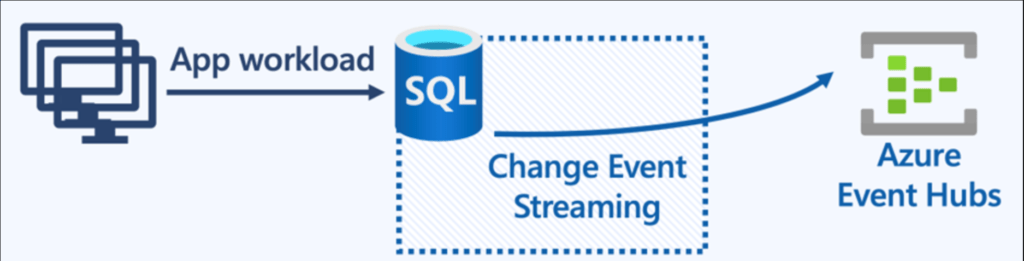
Change Event Streaming, hereafter CES, is an updated data‑integration feature between SQL Server and Azure Event Hub. This functionality captures the changes that occur inside your database and sends them directly to an Azure Event Hub.
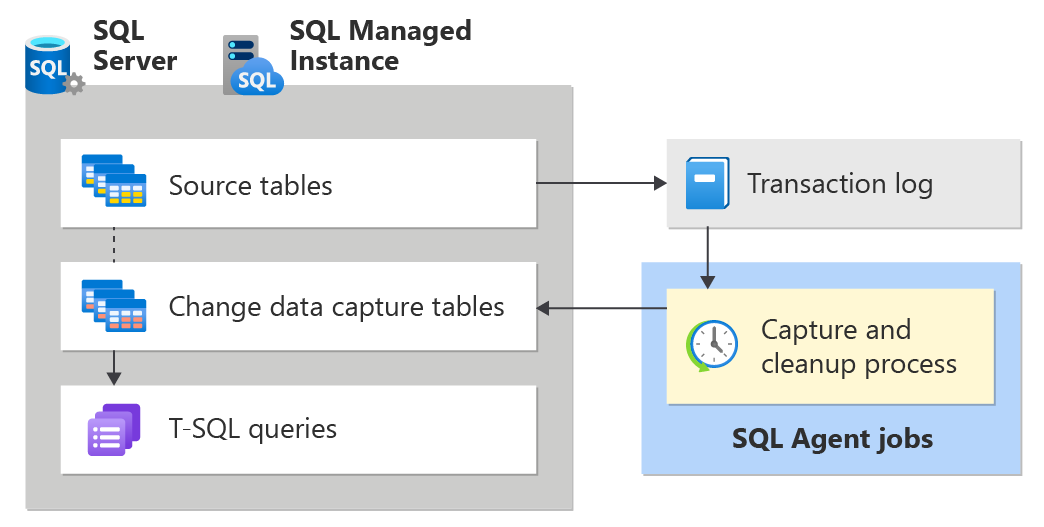
To understand why we call it “updated,” let’s look at where we come from. The closest feature we’ve had until now is CDC, which also captured changes from the Log, but stored them in internal tables within the database until they were consumed. If you want to learn more about CDC, you can always check the previous post.
To make this easier to understand, let’s include a comparison table and explain the key differences and advantages of CES over CDC.
| Aspect | Change Data Capture (CDC) | Change Event Streaming (CES) |
|---|---|---|
| Capture Source | Committed transactions from transaction log (async). Requiere SQL Agent | Committed transactions from transaction log (async) |
| Capture Destination | System table (extra logging required) | Event stream (“IOless”) |
| Data Captured | Row identifier and data | Row identifier and data (DDL allowed) |
| Capture Method | Query system tables. Multiple destinations | Process event stream (“IOless”). Single destination |
| Availability | Near real-time (pull-based) | Near real-time (push-based) |
| SQL Effects | Transaction log truncation | Transaction log truncation |
| Typical Use Cases | Data warehousing and auditing | Event-driven architectures – microservices integration, real-time analytics, cache sync, AI Agents |
Advantages and Disadvantages of CES
Data Capture Source:
Both CES and CDC read asynchronously from the Transaction Log, which means they don’t affect the performance of the source table. However, with CES there’s no need for an agent to capture these changes.
Destination of Captured Data:
Unlike CDC, which required additional I/O to store the captured data in an auxiliary table before consuming it, CES doesn’t need to save the data anywhere. SQL Server reads the changes directly from the Log and sends them to Azure Event Hub, resulting in much lower I/O usage.
Captured Data:
Both capture the data changes, but CES also includes DDL-related changes.
Capture Method:
This point is crucial, as it’s where CES has its main disadvantage: you can only configure one destination per table. In contrast, CDC allows multiple destinations.
Availability:
Availability works differently in each approach. With CDC, the consumer connects to the database and requests the data. With CES, SQL Server pushes the changes automatically as soon as they’re available. Both operate very close to real time.
Use Cases:
CDC is more oriented toward Data Warehouse and auditing scenarios. CES, on the other hand, by sending data directly to Azure, opens the door to many new possibilities such as reacting to real-time events, integrating with microservices, or loading data directly for analytics.

CES Configuration
Let’s walk through a simple example of how to configure CES using an Azure Event Hub.
- Configure the Master Key. (Whenever we work with security, this step is required.)
CREATE MASTER KEY ENCRYPTION BY PASSWORD = '<SecurePassword>'
- Generate our Event Hub in Azure Event Hubs and create the SAS key. (We won’t detail the entire process here, as it’s not the main focus of this post.)
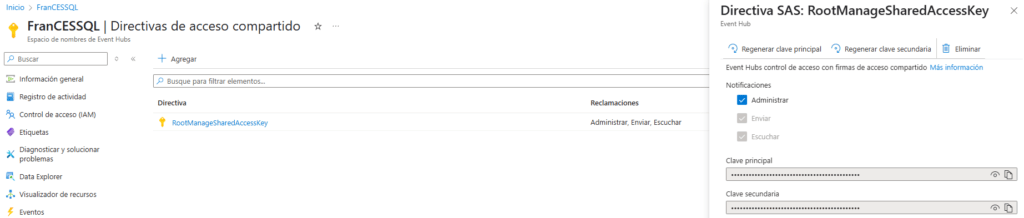
We create our Credential in SQL Server. We also include a PowerShell script in case there are issues generating it.
CREATE DATABASE SCOPED CREDENTIAL [CREDENTIAL_CES]
WITH IDENTITY = 'SHARED ACCESS SIGNATURE',
SECRET = 'SharedAccessSignature sr=https%3a%2f%2...';
PowerShell script in case of issues generating the SAS key.
$namespace = "FranCESSQL"
$hub = "Hub_Name"
$resourceUri = "$namespace.servicebus.windows.net/$hub"
$uriEncoded = [System.Web.HttpUtility]::UrlEncode("https://$resourceUri")
$sasKey = "<PrincipalPass>=" # Tu clave
$policyName = "RootManageSharedAccessKey"
$expiry = int + 3600) # 1h
$stringToSign = "$uriEncoded`n$expiry"
$hmacsha256 = New-Object System.Security.Cryptography.HMACSHA256
$hmacsha256.Key = [Text.Encoding]::UTF8.GetBytes($sasKey)
$signatureBytes = $hmacsha256.ComputeHash([Text.Encoding]::UTF8.GetBytes($stringToSign))
$signature = [System.Convert]::ToBase64String($signatureBytes)
$sasToken = "SharedAccessSignature
$sasToken = "SharedAccessSignature sr=$uriEncoded&sig=$([System.Web.HttpUtility]::UrlEncode($signature))&se=$expiry&skn=$policyName"
write-host $sasToken
- We will create our sample table.
CREATE TABLE dbo.Productos (
Id INT PRIMARY KEY clustered identity ,
Nombre NVARCHAR(100),
Precio DECIMAL(10, 2),
Categoria NVARCHAR(50)
);
- We will enable CES in our database.
EXEC sys.sp_enable_event_stream
- We define the connection from SQL Server to Event Hub through the credential.
EXEC sys.sp_create_event_stream_group
@stream_group_name = N'EventStreamGroupName',
@destination_type = N'AzureEventHubsAmqp',
@destination_location = N'FranCESSQL.servicebus.windows.net/Hub_Name',
@destination_credential = CREDENTIAL_CES
- We enable our table for CES.
EXEC sys.sp_add_object_to_event_stream_group
N'EventStreamGroupName',
N'dbo.Productos'
- We verify the configurations to ensure everything is correct and that no errors are present.
EXEC sys.sp_help_change_feed_settings
EXEC sp_help_change_feed_table @source_schema = 'dbo', @source_name = 'Productos'
SELECT * FROM sys.dm_change_feed_errors
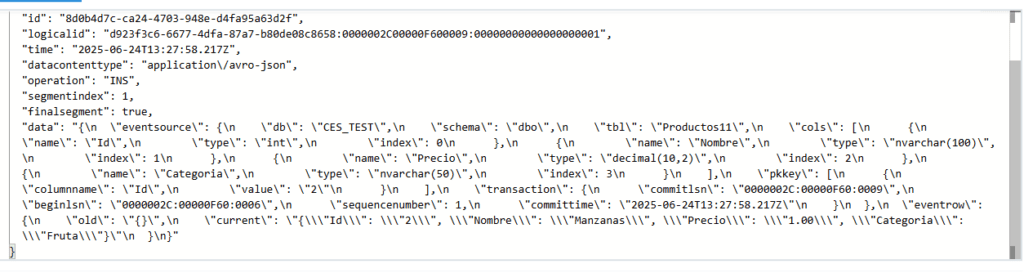
- We insert a record into our table.
insert into dbo.Productos values('Manzanas','1','Fruta')
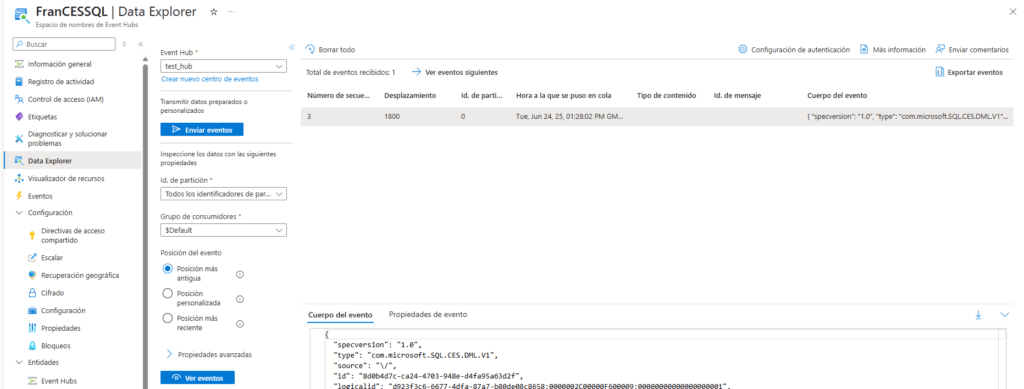
- We verify that the data has been replicated to our Azure Event Hub correctly.
Hasta aquí el post de hoy. Espero que te haya servido de ayuda para conocer las posibilidades de su futuro nuevo SQL Server.
Documentation
SQL 2025 Change Event Streaming (CES)
Articles in the SQL Server 2025 Series
- Part 1: All the new features in SQL Server 2025
- Part 2: Optimized Locking in SQL Server 2025
- Part 3: New ZSTD backup compression algorithm for SQL Server 2025
- Part 4: Change Event Streaming (CES) in SQL Server 2025
- Part 5: SQL Server 2025 improves JSON performance with indexes and new functions
- Part 6: Vector Search in SQL Server 2025: VECTOR data type and DiskANN
- Part 7: How to use regular expressions (REGEX) in SQL Server 2025
- Part 8: New in Intelligent Query Processing in SQL Server 2025
- Part 9: All New Features in SQL Server Management Studio 22
- Part 10: Data API Builder for Azure Databases

Data Engineer.