
Delta Table Optimization in Fabric (Part I): Fragmentation

Optimizing Delta table performance is one of the most common challenges in Fabric environments. In this first post, we establish the starting point: the test environment, the methodology, and the metrics we will use throughout the series to evaluate each optimization technique.
Introduction
For all tests in this series, we will use the salesorderdetail table, with over 1.3 billion rows, joined against the Product table using the following query:
SELECT
    p.name AS Product,
    COUNT(*) AS Sales,
    COUNT(DISTINCT SalesOrderID) AS DiffSales,
    SUM(LineTotal) AS Total
FROM dbo.salesorderdetail_1000m AS a
JOIN dbo.Product AS p
    ON p.ProductID = a.ProductID
WHERE p.ProductID IN (955, 748, 935)
GROUP BY p.name
This query will serve as a consistent reference throughout the series, allowing us to compare the real impact of each optimization technique on the same dataset.
Every time we make a modification to improve table performance, we will log the results in query_benchmark_results using the following script, allowing us to objectively compare the impact of each optimization throughout the series.
start_time = datetime.now()
start = time.time()

description = "raw"

query = f"""
SELECT
    p.name AS Product,
    COUNT(*) AS Sales,
    COUNT(DISTINCT SalesOrderID) AS DiffSales,
    SUM(LineTotal) AS Total
FROM dbo.salesorderdetail_1000m AS a
JOIN dbo.Product AS p
    ON p.ProductID = a.ProductID
WHERE p.ProductID IN (955, 748, 935)
GROUP BY p.name
"""

df = spark.sql(query)
display(df)

end = time.time()
duration_seconds = end - start

print(duration_seconds)

result = spark.createDataFrame([
    Row(
        description=description,
        query_text=query,
        start_time=start_time,
        duration_seconds=float(duration_seconds)
    )
])

result.write.format("delta").mode("append").saveAsTable("dbo.query_benchmark_results")
Each execution will be logged in the query_benchmark_results table in Delta format, with its description, the executed query, the start time and the duration in seconds, building a comparable performance history across all tests in the series.
Step 1: DESCRIBE DETAIL
We will run the following code to obtain detailed information about our table:
df = spark.sql("DESCRIBE DETAIL demo_rendimiento_delta.dbo.salesorderdetail_1000m")
display(df)
The result obtained is as follows:
| Field | Value |
|---|---|
format | delta |
id | 097856ec-5dd2-4d25-aaf8-265c7dae6470 |
name | spark_catalog.chimcobldhq2agac8l9kujh05kg4cga2a94k681d4114i815chimqrqve9imsp39dlkmarjkdtfm8pbcehgiap32ds.salesorderdetail_1000m |
description | — |
location | abfss://953b832a-cc6d-462b-a943-4cf7b1f44848@onelake.dfs.fabric.microsoft.com/529d84c4-794c-4bc8-b7da-5f7fa5a51e6f/Tables/dbo/salesorderdetail_1000m |
createdAt | 26/05/2026 00:58 |
lastModified | 27/05/2026 00:58 |
partitionColumns | [] |
clusteringColumns | [] |
numFiles | 128 |
sizeInBytes | 3.338.144.372 |
properties | {“delta.stats.extended.collect”:”true”,”delta.stats.extended.inject”:”true”} |
minReaderVersion | 1 |
minWriterVersion | 2 |
tableFeatures | [“appendOnly”,”invariants”] |
Of all the available fields, the relevant ones for evaluating the table status and planning its optimization are the following:
numFiles: number of active Parquet files in the table. A high value relative to the table size is indicative of fragmentation.sizeInBytes: total size of the table in bytes. It allows us to size the table and calculate the average file size.partitionColumns: columns used for physical partitioning of the table. It is important to verify that the partitioning makes sense for the most common query patterns.clusteringColumns: columns used for Liquid Clustering. We must verify that they match the most frequently used filters in queries.tableFeatures: indicates the Delta features enabled in the table.
Step 2: Fragmentation
The first thing we need to check is whether our table data is split across too many .parquet files, which is known as fragmentation. To verify this, we look at two values obtained in the previous step:
numFiles: 128sizeInBytes: 3.338.144.372 (3,11 GB)
The general rule to determine whether fragmentation exists is the following:
| Table size | Recommended numFiles |
|---|---|
| 100 GB | < 1.000 |
| 500 GB | < 5.000 |
| 1 TB | < 10.000 |
OPTIMIZE nombre_tabla

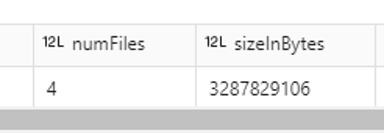
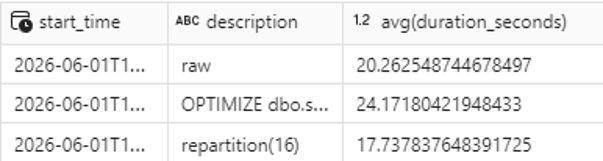
After running OPTIMIZE, the number of files dropped from 128 to 4, but performance not only failed to improve — it actually got worse: the query went from 20.26 to 24.17 seconds:

Fewer files does not always mean better performance. In this case, over-consolidating the data has penalized the query.
Microsoft’s documentation states that the ideal file size for .parquet files in a Delta table is the following:
| Table size | Recommended file size |
|---|---|
| < 10 GB | 128 MB |
| 10 GB – 10 TB | 256 MB – 512 MB |
| > 10 TB | 1 GB |
With 4 files for 3.11 GB, our files are around 800 MB each, well above the recommended size for this data volume. Ideally, we should have files of around 128 MB, which leads us to work with 16 files. To adjust the number of partitions, the table needs to be recreated:
df = spark.read.table("demo_rendimiento_delta.dbo.salesorderdetail_1000m")

df.repartition(16) \
  .write \
  .mode("overwrite") \
  .format("delta") \
  .saveAsTable("demo_rendimiento_delta.dbo.salesorderdetail_1000m")
By applying repartition(16) we obtain 16 files of ~195 MB each, and the results speak for themselves: the query improves by 2.5 seconds, representing a 12.3% improvement over the previous state.
Conclusion
OPTIMIZE can be useful in certain scenarios, but as we have seen, it is not a universal solution. Recreating the table and testing different .parquet file sizes based on the data volume is always a good optimization strategy.
In the next entry of the series, we will explore ZORDER, partitionColumns and clusteringColumns, and we will see how these techniques can make a significant difference in the performance of our Delta tables.
FAQ – Frequently Asked Questions
What is fragmentation in a Delta table?
Fragmentation occurs when a table’s data is split across too many small .parquet files. This can slow down queries because the engine has to open and process a large number of files to return a result.
How do I know if my Delta table has fragmentation?
By running DESCRIBE DETAIL on your table you can obtain the numFiles and sizeInBytes values. Dividing the total size by the number of files gives you the average file size, which you can compare against Microsoft’s recommended thresholds.
Does OPTIMIZE always improve performance?
No. As we have shown in this post, OPTIMIZE can over-consolidate files and actually penalize query performance. In our case it made performance worse by 12%. It is always recommended to measure before and after applying it.
What is the ideal .parquet file size in a Delta table?
Microsoft recommends file sizes of 128 MB for tables under 10 GB, between 256 MB and 512 MB for tables up to 10 TB, and 1 GB for tables larger than 10 TB.

Business Intelligence Expert Consultant. Specialising in creation of Data Warehouse, Fabric, Analysis Services, Databricks, Power BI, SSIS and SSRS.