
Delta Table Optimization in Fabric (Part II): ZORDER, partitionBy and clusterBy

Optimizing Delta tables in Microsoft Fabric inevitably comes down to choosing the right partitioning strategy. ZORDER, partitionBy and clusterBy are the three main tools at your disposal, and each one behaves very differently depending on your table’s query pattern.
In the first part we analyzed the structure of Delta tables and how it affects query performance. In this second installment we will look at the different partitioning and sorting strategies available in practice: OPTIMIZE ZORDER, partitionBy and clusterBy, with real execution times so you can compare which one best fits your use case.
💡 If you haven’t read Part 1 yet, we recommend doing so before continuing: it lays the groundwork needed to understand the results in this post.
1. OPTIMIZE ZORDER
OPTIMIZE ZORDER combines two operations in a single command:
- OPTIMIZE compacts small files. If you have, for example, 10 files of 10 MB each, it will rewrite them into a single 100 MB file.
- ZORDER sorts the data within those compacted files by the column you specify, so that related values end up physically close together in storage.

When we run the command, it returns the following information:
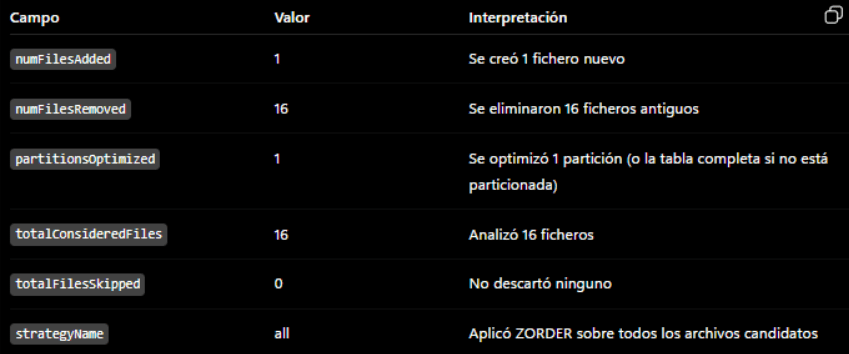
In our test, the execution deleted the original 16 Parquet files and compacted everything into 1 single file, applying ZORDER to it.
Result on the test query
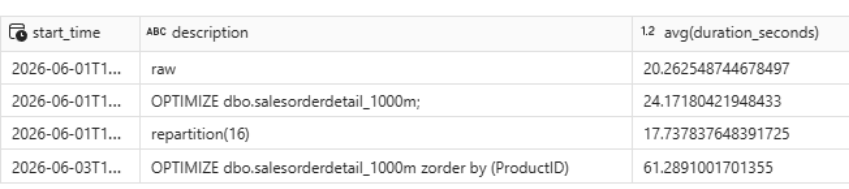
Execution time worsened from 17.73 s to 61.28 s. This happens because the query was filtering by ProductID on the Product table, not on salesorderdetail_1000m — which is the table where ZORDER was applied. The sort order is not helping the filter predicate.
To verify this, we modified the query so that the ProductID filter falls directly on salesorderdetail_1000m:
SELECT
p.name        AS Product,
COUNT(*)      AS Sales,
COUNT(DISTINCT SalesOrderID) AS DiffSales,
SUM(LineTotal) AS Total
FROM dbo.salesorderdetail_1000m AS a
JOIN dbo.Product AS p
ON p.ProductID = a.ProductID
WHERE a.ProductID IN (955, 748, 935)
GROUP BY p.name;

With this change we get a 5-second improvement, although it still falls short of the repartition(16) result seen in the previous part. The conclusion is clear: ZORDER is only effective when the sorted column matches the active filter predicate.
2. partitionBy
partitionBy partitions the table by the specified column, creating a separate Parquet file for each distinct value in that column. It is the Delta equivalent of classic Hive partitioning.
df = spark.read.table("demo_rendimiento_delta.dbo.salesorderdetail_1000m")
df.write
.format("delta")
.mode("overwrite")
.option("overwriteSchema", "true")
.partitionBy("ProductID")
.saveAsTable("demo_rendimiento_delta.dbo.salesorderdetail_1000m")
After writing, we run DESCRIBE DETAIL to check the table state:
DESCRIBE DETAIL demo_rendimiento_delta.dbo.salesorderdetail_1000m;
| Property | Value |
|---|---|
partitionColumns | ["ProductID"] |
clusteringColumns | [] |
numFiles | 142 |
sizeInBytes | 81,376,866 |
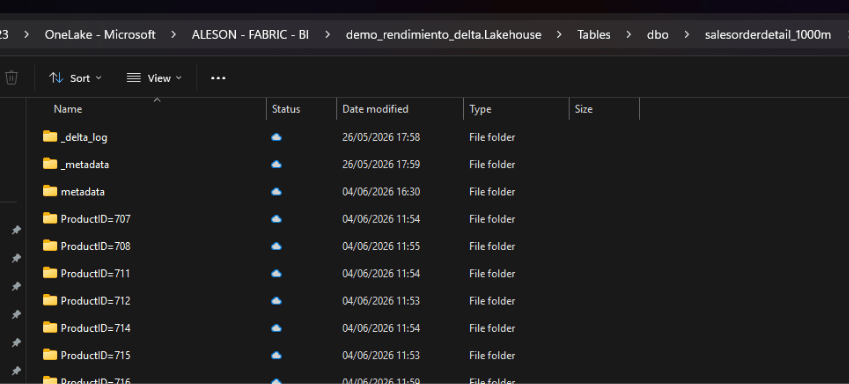
The table now has 142 partitions, one for each distinct ProductID.
Exploring partitions in OneLake
You can verify the physical structure by opening Microsoft OneLake File Explorer for Windows (download here), navigating to your Lakehouse and opening the table folder. You will see one subfolder per ProductID value.
Result on the test query
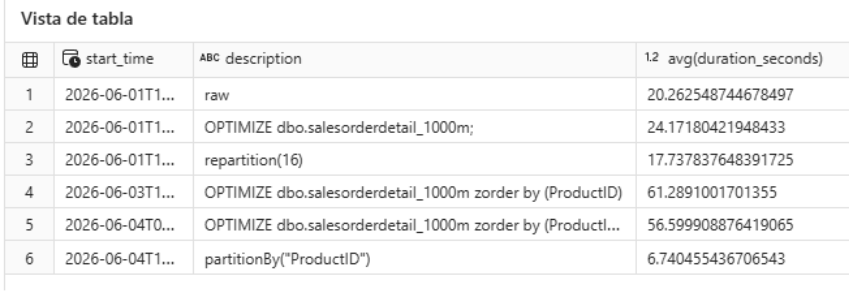
Execution time dropped from 20.26 s to 6.74 s, an improvement of approximately 300%. The reason is straightforward: since the query filters on only 3 ProductID values, the engine only needs to read 3 out of 142 partitions, skipping the rest entirely (partition pruning).
⚠️ Watch out for cardinality. If instead of 142 distinct values there were tens of thousands, partitioning would generate excessive fragmentation that would hurt performance on queries not filtering by
ProductID. This problem is covered in detail in Part 1.
3. clusterBy (Liquid Clustering)
clusterBy is the modern alternative to classic partitioning. Instead of creating physical directories per column value, it applies intelligent co-location within each file so that records with nearby values of the specified column end up grouped together. It cannot be used alongside partitionBy on the same table.
CREATE OR REPLACE TABLE dbo.salesorderdetail_1000m
USING DELTA
CLUSTER BY (ProductID)
AS
SELECT *
FROM dbo.salesorderdetail_1000m;
The DESCRIBE DETAIL output after the operation:
| Property | Value |
|---|---|
partitionColumns | [] |
clusteringColumns | ["ProductID"] |
numFiles | 8 |
sizeInBytes | 84,835,802 |
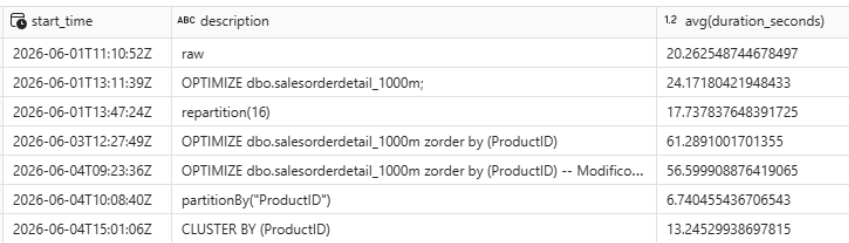
The table now has 8 files, sorted internally by ProductID. It is a solid option with less fragmentation risk than partitionBy, although for this specific query it still falls behind: filtering on only 3 ProductID values, partitionBy allows the engine to skip 139 partitions outright, while clusterBy must scan all 8 files — albeit more efficiently.
4. PARTITIONED BY + ZORDER BY
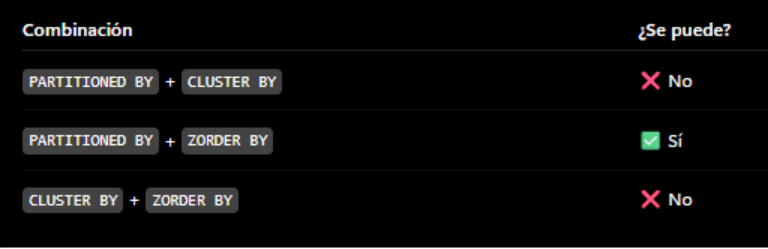
This is the only two-level combination Delta allows: partition by one column and apply ZORDER within each partition by a different column. In our case, we partition by ProductID and sort each partition by SalesOrderID, since the test query includes a COUNT(DISTINCT SalesOrderID).
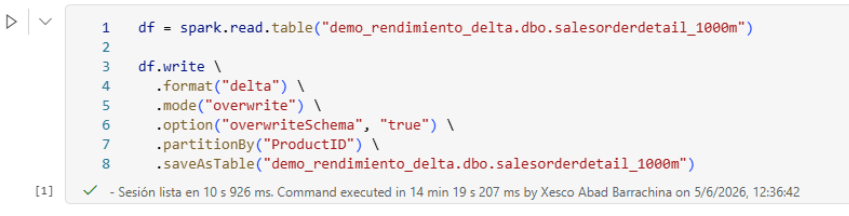
Step 1 — Run partitionBy:
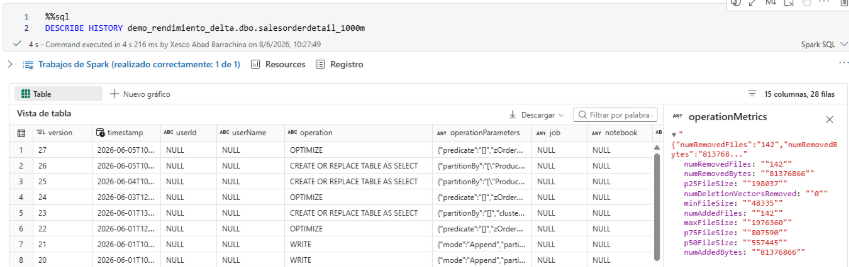
Step 2 — Run OPTIMIZE ZORDER:

Note:
DESCRIBE DETAILdoes not reflectZORDERinformation. To see it, query the table history:
DESCRIBE HISTORY demo_rendimiento_delta.dbo.salesorderdetail_1000m;

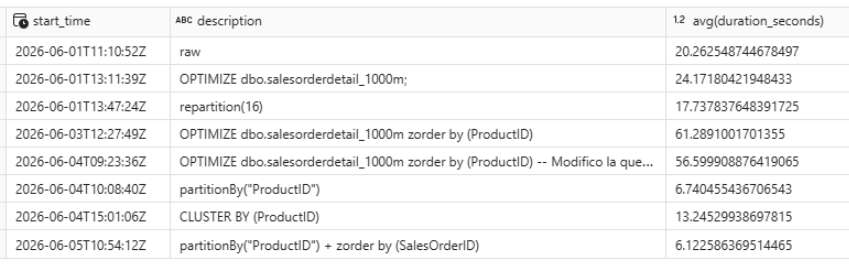
Execution time comparison table
The partitionBy + ZORDER BY combination shows a slight improvement over the previous best result, although the difference is not dramatic for this particular query.
Conclusion
Just as it happens with relational databases, there is no universal optimal configuration for Delta tables. The right strategy depends entirely on the workload pattern:
OPTIMIZE ZORDERis useful when you want to compact files and there is a clear filtering pattern, but it does not create physical partitions. It only benefits queries that filter on the sorted column.partitionBydelivers the biggest performance jump when the partition column has low cardinality and queries almost always filter by it. High cardinality leads to fragmentation.clusterBy(Liquid Clustering) is the most flexible option with the lowest fragmentation risk. Recommended when access patterns are varied or cardinality is high.partitionBy + ZORDER BYcombines the speed of partitioning with a second-level internal sort. Appropriate when there are two relevant filtering dimensions.
A Data Warehouse designed to feed a semantic model has completely different access patterns from an operational table queried by an application. Define your use case first, then choose your strategy.
FAQ — Frequently asked questions about Delta table partitioning in Microsoft Fabric
When should I use partitionBy and when should I use clusterBy on a Delta table?
Use partitionBy when the partition column has low cardinality (a few dozen or hundred distinct values) and your queries almost always filter by it. Use clusterBy (Liquid Clustering) when cardinality is high or access patterns are varied: it avoids fragmentation and requires no manual maintenance. In Microsoft Fabric, Databricks recommends clusterBy as the default choice for new tables.
What does OPTIMIZE ZORDER actually do in Delta Lake?
OPTIMIZE compacts small Parquet files into larger ones to reduce the number of I/O operations. ZORDER reorders the data within those files so that records with nearby values in the specified column end up physically close together. The result is that the engine can skip irrelevant data blocks during reads (data skipping). It only improves performance if the query filters on the column used in ZORDER.
Why doesn’t DESCRIBE DETAIL show ZORDER information?
ZORDER is a physical reordering operation, not a structural table metadata property. Delta Lake does not store it as a property in DESCRIBE DETAIL. To see the full operation history — including OPTIMIZE ZORDER — you need to run DESCRIBE HISTORY table_name, which logs every operation applied with its timestamp and parameters.
Can I combine partitionBy and clusterBy on the same Delta table?
No. Delta Lake does not allow both strategies simultaneously on the same table. You can, however, combine partitionBy with ZORDER BY: first partition the table, then run OPTIMIZE ZORDER to sort within each partition by a second column. This is the only natively supported two-level sorting combination.
How does Delta partitioning affect the performance of a semantic model in Power BI or Microsoft Fabric?
The impact depends on the model’s access pattern. If the semantic model runs queries that filter on the partition column, the benefit is direct and significant. If queries aggregate over the entire table without selective filters, partitioning adds little value and may even increase load time due to fragmentation. Ideally, design your partitioning strategy aligned with the most frequent report filters. If you need help optimizing this layer, the Aleson ITC Data Analytics team can review your architecture.
What partitioning strategy does Databricks/Microsoft Fabric recommend for large production tables?
The current Databricks recommendation for Delta Lake in Microsoft Fabric is to use Liquid Clustering (clusterBy) instead of partitionBy for new tables, especially when they exceed 200 GB or have variable access patterns. Liquid Clustering allows incremental data reorganization with OPTIMIZE without the need to rewrite the entire table, dramatically reducing maintenance costs in production.

Business Intelligence Expert Consultant. Specialising in creation of Data Warehouse, Fabric, Analysis Services, Databricks, Power BI, SSIS and SSRS.