
How to use regular expressions (REGEX) in SQL Server 2025

Introduction
For many years, working with text in SQL Server has been a frustrating task. While some engines offered advanced support for regular expressions, others had to rely on combinations of LIKE, PATINDEX, CHARINDEX, or even CLR functions to solve relatively common problems.
In 2025, the situation has changed. SQL Server 2025 introduces native REGEX functions, allowing complex text to be validated, cleaned, and analyzed directly.
What is REGEX?
Regular expressions are a specialized language used to describe text patterns. Unlike traditional comparisons, they allow you to identify complete structures: formats, repetitions, ranges, and complex combinations of characters.
How regular expressions work in T-SQ
When SQL Server evaluates a regular expression, it does so character by character. It does not use indexes, does not benefit from statistics, and cannot internally optimize the pattern.
This means that every evaluated row has a real CPU cost. For this reason, REGEX should be understood as a precision tool, not as a function designed to filter millions of rows in real time.
A typical pattern such as:
[A-Za-z0-9._%+-]+   → Email username
@                  → Mandatory separator
[A-Za-z0-9.-]+     → Domain
\.                 → Literal dot
[A-Za-z]{2,}       → Extension with at least 2 characters
REGEX functions available in SQL Server
In SQL Server 2025, the main native functions are:
| REGEXP_LIKE | Returns a boolean value indicating whether the input text matches the regex pattern. |
|---|---|
| REGEXP_REPLACE | Returns the source string with occurrences of the regex pattern replaced by a replacement string. |
| REGEXP_SUBSTR | Extracts parts of a string based on a regular expression pattern. Returns the Nth occurrence of a substring that matches the regex pattern. |
| REGEXP_INSTR | Returns the starting or ending position of the matching substring, depending on the option provided. |
| REGEXP_COUNT | Returns the number of times the regex pattern occurs in a string. |
| REGEXP_MATCHES | Returns a table of captured substrings that match a regular expression pattern within a string. If no match is found, the function returns no rows. |
| REGEXP_SPLIT_TO_TABLE | Returns a table of strings split using the regex pattern as a delimiter. If no match is found, the function returns the original string. |
These functions cover the vast majority of real-world scenarios without relying on external solutions.
Real-world examples in SQL Server
In real environments, data is not always perfectly structured. It is common to find log tables, audit data, or integrations where multiple values are concatenated into a single text column.
For example:
CRITICAL UserID=1004 Email=nombre.apellido@aleson.com Tel=699 123 456 Order=ORD-2025-004 Amount=999.99
Here we have clearly structured information (user, email, phone number, order, amount), but stored as free text.
When we need to validate, search, or analyze any of these values, we must first extract and separate them. In these types of scenarios, REGEXP functions in SQL Server allow us to work with unstructured data without having to redesign the entire system.
In this practical example, we will see how to do it step by step.
EXAMPLES
REGEXP_REPLACE
SELECT
    Event,
    REGEXP_REPLACE(
        REGEXP_SUBSTR(Event, 'Tel=[^ ]+'),
        '[^0-9]',
        ''
    ) AS PhoneNumber
FROM System_events;

In this case, we extract the Tel=[^ ]+ part and remove any character that is not a number.
REGEXP_LIKE
SELECT *
FROM System_events
WHERE REGEXP_LIKE(Event, '^(ERROR|CRITICAL)')
AND REGEXP_LIKE(Event, 'Amount=([5-9][0-9]{2}\.[0-9]{2})');

Here we use REGEXP_LIKE to filter events that start with ERROR or CRITICAL and have an amount greater than 500.
REGEXP_SUBSTR
SELECT *
FROM System_events

These are the data we have.
SELECT
    REGEXP_SUBSTR(Event, '^[A-Z]+') AS Type,
    REGEXP_SUBSTR(Event, '[0-9]{4}') AS UserID,
    REGEXP_SUBSTR(Event, 'ORD-[0-9]{4}-[0-9]{3}') AS [Order],
    REGEXP_SUBSTR(Event, '[0-9]+\.[0-9]{2}') AS Amount,
    REGEXP_SUBSTR(Event, '[A-Za-z0-9._%+-]+@[A-Za-z0-9.-]+\.[A-Za-z]{2,}') AS Email
FROM System_events;
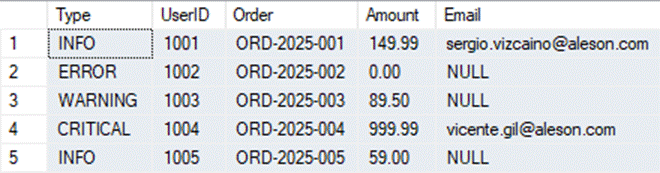
We have taken the combined data and structured it into multiple fields.
REGEXP_COUNT
SELECT
    Id,
    REGEXP_SUBSTR(Event, '[^ ]+@[^ ]+') AS Email,
    REGEXP_COUNT(Event, '@') AS AtCount
FROM System_events
WHERE REGEXP_COUNT(Event, '@') >= 1;
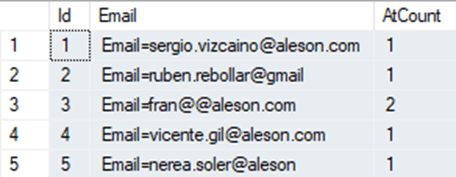
In this example, we validate the email by counting how many @ symbols it contains. In this case, we can see one entry with two @ symbols.
SELECT
    Id,
    REGEXP_COUNT(
        REGEXP_SUBSTR(Event, 'Tel=[^ ]+'),
        '[0-9]'
    ) AS PhoneDigits
FROM System_events;
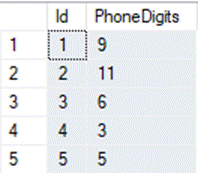
We can validate phone numbers by counting how many digits they contain.
REGEXP_INSTR
SELECT
    Id,
    REGEXP_SUBSTR(Event, '[A-Za-z0-9._%+-]+@[A-Za-z0-9.-]+\.[A-Za-z]{2,}') AS Email
FROM System_events
WHERE REGEXP_INSTR(Event, '@') > 0;
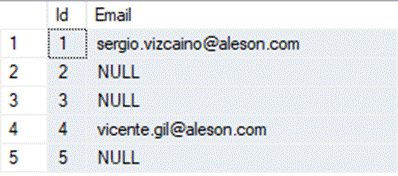
This query extracts the first text that matches a valid email format. It only returns rows that contain at least one @ symbol.
Conclusion
In 2025, SQL Server offers native support for regular expressions, representing a significant improvement. However, REGEX does not turn SQL Server into an advanced text search engine.
Its role is clear: to validate, clean, and prepare data — not to filter large volumes of text.
Articles in the SQL Server 2025 Series
- Part 1: All the new features in SQL Server 2025
- Part 2: Optimized Locking in SQL Server 2025
- Part 3: New ZSTD backup compression algorithm for SQL Server 2025
- Part 4: Change Event Streaming (CES) in SQL Server 2025
- Part 5: SQL Server 2025 improves JSON performance with indexes and new functions
- Part 6: Vector Search in SQL Server 2025: VECTOR data type and DiskANN
- Part 7: How to use regular expressions (REGEX) in SQL Server 2025
- Part 8: New in Intelligent Query Processing in SQL Server 2025
- Part 9: All New Features in SQL Server Management Studio 22
- Part 10: Data API Builder for Azure Databases

Junior Data Analyst.