
Vector Search in SQL Server 2025: VECTOR data type and DiskANN
Introduction
It is clear that AI is here to stay, and Microsoft knows it. That is why the 2025 version of SQL Server comes with a new feature for the AI era: the use of vectors for search. By this point in 2026, terms like “semantic search” will already sound familiar. This new feature provides a new way to search and analyze data, especially unstructured data, directly within SQL Server.
Understanding vectors and how they work
A vector is nothing more than a data type that stores an ordered list of numbers representing complex data in a numerical format that AI can understand and compare.
A vector embedding is a way to convert a sentence, an image, or almost anything into a vector—that is, a list of numbers that represents it. These numbers exist in a very high-dimensional space and are generated by machine learning models that understand the context of the data.
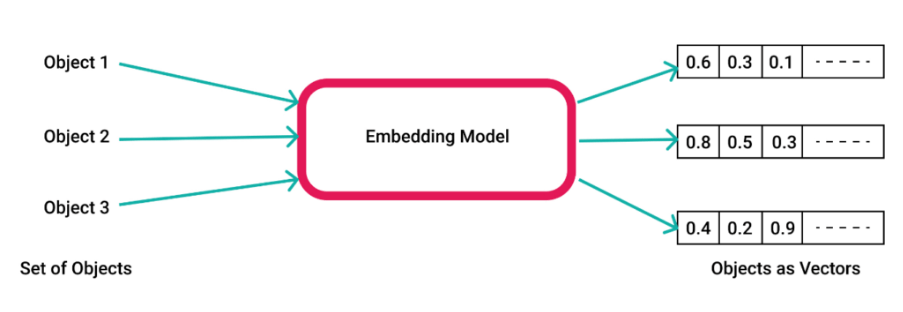
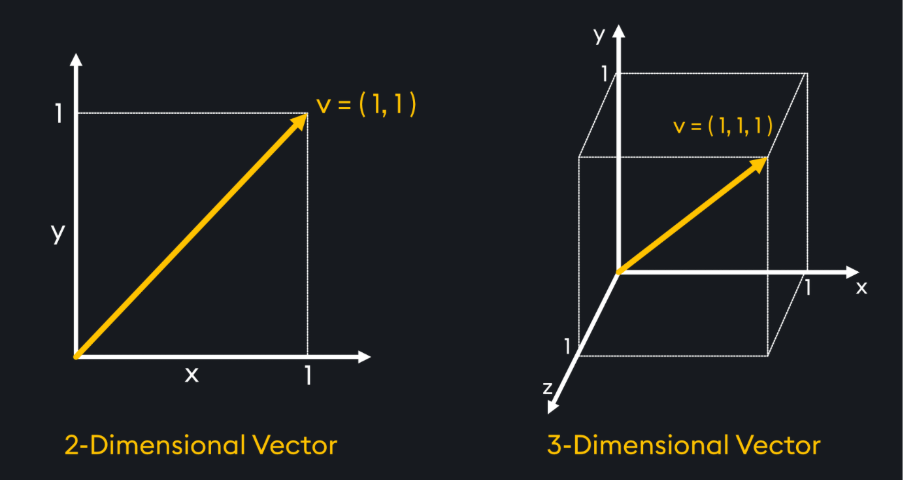
Each dimension of the vector represents a characteristic of the vectorized data. For example, if we vectorize a sentence, each dimension of its vector represents some nuance of its meaning, its grammar, or its context. The higher the number of dimensions, the better the understanding of the data—at the cost of reduced performance.
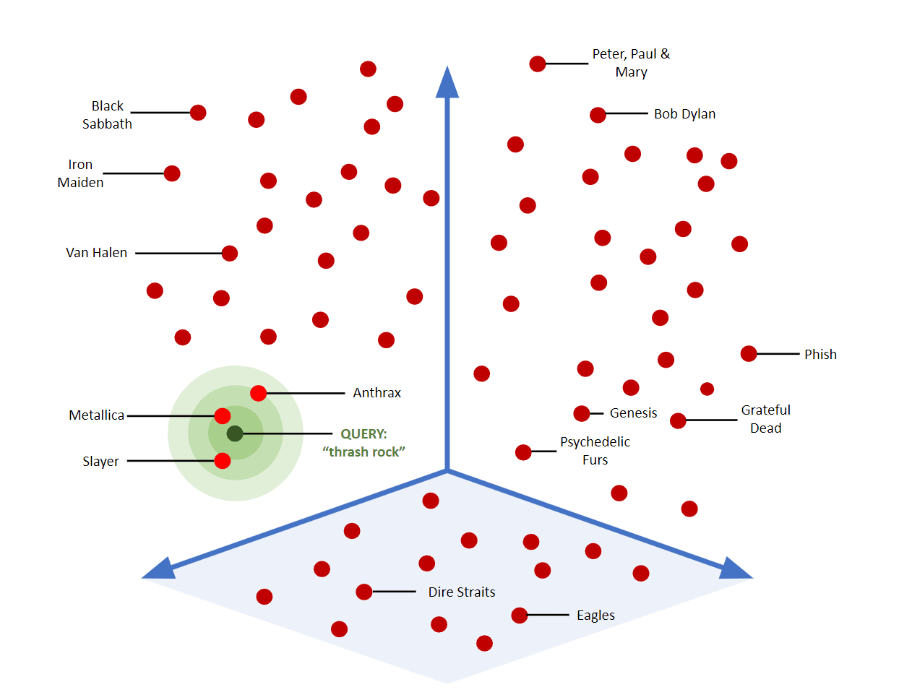
This makes it possible to search for ideas instead of exact words. For example, if we have data from all the Airbnbs in a given province, we could search for “I like surfing” without the listing explicitly stating that it is located near the sea.
In the following image, where each vector represents a music group, we can see the proximity between neighboring vectors and how they would be distributed in a dimensional space.
Implementation
SQL Server already supports the new VECTOR data type, so we can now store embeddings directly in tables.
Each element of the vector is stored as a 4‑byte floating‑point value. The vector itself is stored in an optimized binary format, but it is displayed as a JSON array for convenience.
In the example we are going to present, we will create a table of AI‑related articles with a VECTOR field to store the embedding. Then, we will use OpenAI to generate the embedding from the field that describes the article and create an index to perform semantic search and sort the articles based on the distance between them—that is, their similarity. For this, we will use the DiskANN algorithm (Disk‑based Approximate Nearest Neighbor), developed by Microsoft Research. This algorithm is designed to quickly find nearest neighbors in large datasets while using very little RAM, relying mainly on SSD storage. It minimizes disk reads and does so efficiently. It also uses little memory by creating a graph‑based structure where each vector is connected to its closest neighbors.
Vector Search implementation with code
The first thing we need to do is enable external invocation of the REST endpoint in our SQL Server:
EXECUTE sp_configure 'external rest endpoint enabled', 1;
RECONFIGURE WITH OVERRIDE;
GO
To be able to create credentials, we first need to create a master key if we don’t already have one:
IF NOT EXISTS (SELECT *
               FROM sys.symmetric_keys
               WHERE [name] = '##MS_DatabaseMasterKey##')
    BEGIN
        CREATE MASTER KEY ENCRYPTION BY PASSWORD = N'<password>';
    END
GO
After that, we create the credential:
CREATE DATABASE SCOPED CREDENTIAL [https://<myendpoint>.openai.azure.com/]
    WITH IDENTITY = 'HTTPEndpointHeaders', secret = '{"api-key":"....."}';
GO
Then we create an external model to call the Azure OpenAI embeddings REST endpoint.
CREATE EXTERNAL MODEL MyAzureOpenAIModel
WITH (
      LOCATION = 'https://<myendpoint>.openai.azure.com/openai/deployments/text-embedding-ada-002/embeddings?api-version=2023-05-15',
      API_FORMAT = 'Azure OpenAI',
      MODEL_TYPE = EMBEDDINGS,
      MODEL = 'text-embedding-ada-002',
      CREDENTIAL = [https://<myendpoint>.openai.azure.com/]
);
Once this is done, we can create the table with its corresponding embedding by calling the AI_GENERATE_EMBEDDINGS function.
CREATE TABLE dbo.Articles
(
    id INT PRIMARY KEY,
    title NVARCHAR(100),
    content NVARCHAR(MAX),
    embedding VECTOR(1536)
);
INSERT INTO dbo.Articles (id, title, content)
VALUES (1, 'Intro to AI', 'This article introduces AI concepts.'),
       (2, 'Deep Learning', 'Deep learning is a subset of ML.'),
       (3, 'Neural Networks', 'Neural networks are powerful models.'),
       (4, 'Machine Learning Basics', 'ML basics for beginners.'),
       (5, 'Advanced AI', 'Exploring advanced AI techniques.');
GO

UPDATE dbo.Articles
SET embedding = AI_GENERATE_EMBEDDINGS (content USE MODEL MyAzureOpenAIModel)

Once the table is ready, we will create the index for the corresponding vector.
CREATE VECTOR INDEX vec_idx ON Articles(embedding)
WITH (METRIC = 'cosine', TYPE = 'diskann');
GO
As can be seen, the metric we will use to calculate the distance between two vectors will be cosine (we can also use euclidean and dot), and the algorithm we will use is DiskANN, which is currently the only one supported.
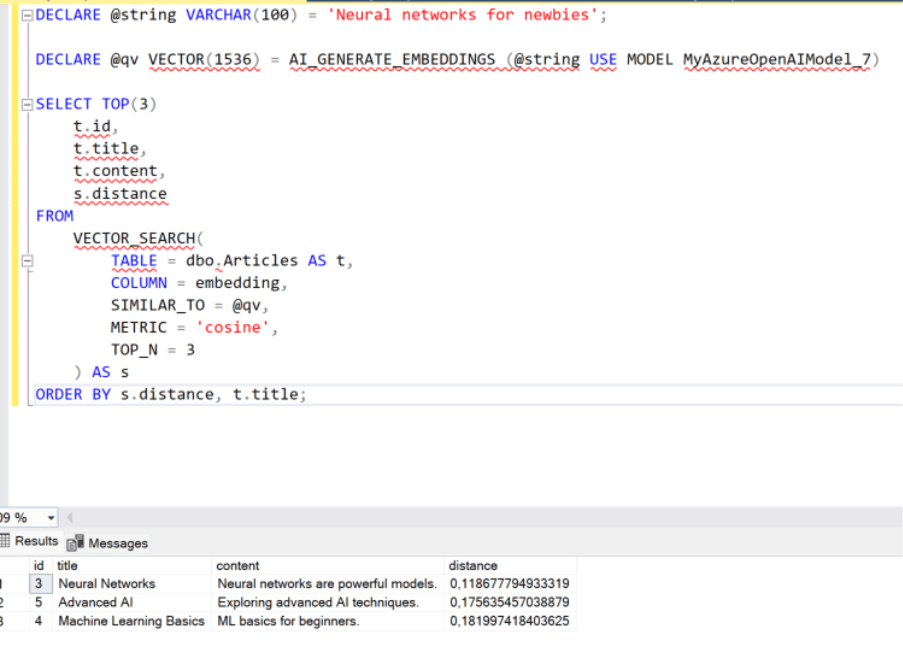
Finally, we will perform a semantic search on the articles to verify that the AI effectively understands the context and returns the articles most similar to what we are looking for.

For example, if we search for “neural networks for beginners”, it will return the article about neural networks, but also the one about advanced AI and machine learning techniques for beginners.
For example, if we search for “neural networks for beginners”, it will return the article about neural networks, but also the one about advanced AI and machine learning techniques for beginners.
DECLARE @string VARCHAR(100) = 'Neural networks for newbies';
DECLARE @qv VECTOR(1536) = AI_GENERATE_EMBEDDINGS (@string USE MODEL MyAzureOpenAIModel_7)

SELECT TOP(3)
    t.id,
    t.title,
    t.content,
    s.distance
FROM
    VECTOR_SEARCH(
        TABLE = dbo.Articles AS t,
        COLUMN = embedding,
        SIMILAR_TO = @qv,
        METRIC = 'cosine',
        TOP_N = 3
    ) AS s
ORDER BY s.distance, t.title;
We hope this has been helpful, and don’t forget to check out the rest of the articles in the SQL Server 2025 new features series.
Articles in the SQL Server 2025 Series
- Part 1: All the new features in SQL Server 2025
- Part 2: Optimized Locking in SQL Server 2025
- Part 3: New ZSTD backup compression algorithm for SQL Server 2025
- Part 4: Change Event Streaming (CES) in SQL Server 2025
- Part 5: SQL Server 2025 improves JSON performance with indexes and new functions
- Part 6: Vector Search in SQL Server 2025: VECTOR data type and DiskANN
- Part 7: How to use regular expressions (REGEX) in SQL Server 2025
- Part 8: New in Intelligent Query Processing in SQL Server 2025
- Part 9: All New Features in SQL Server Management Studio 22

DBA SQL Server with 5 years of experience. Although I have advanced knowledge in various areas of SQL Server, I am also currently discovering MongoDB.
