
Delta Tables in Fabric (Part III): Table Features, Execution Plan and Native Execution Engine
In the previous parts of this series (Part I and Part II) we covered how to structure Delta tables using partitioning and clustering strategies. In this third installment we focus on advanced table configurations, performance diagnostics and optimal runtime environment setup in Microsoft Fabric.
Table Features: advanced Delta table configurations
When creating or maintaining a Delta table, several properties can be enabled that significantly change its behavior. To inspect the current configuration of any table, run:
DESCRIBE DETAIL schema_name.table_name;
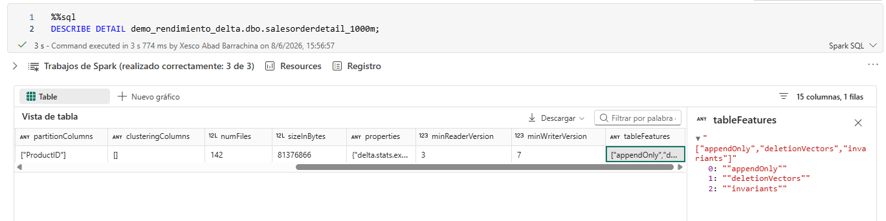
The three most relevant features are described below.
Deletion Vectors
Deletion Vectors enable logical deletes without rewriting the underlying Parquet files. In a standard Delta flow, deleting rows forces a full rewrite of the affected files. With this option enabled, Delta keeps the original file and stores a “mask” marking the invalidated rows — drastically reducing write costs for bulk delete operations.
ALTER TABLE demo_rendimiento_delta.dbo.salesorderdetail_1000m
SET TBLPROPERTIES (
    'delta.enableDeletionVectors' = true
);
AppendOnly
The AppendOnly property restricts the table to insert operations only. It is the ideal configuration for historical or log tables where records are never updated or deleted, as it allows additional internal optimizations by guaranteeing that data only grows.
Invariants / Constraints
Invariants are integrity constraints that Delta enforces on every write operation. They are the functional equivalent of CHECK CONSTRAINTS in SQL Server. If a record does not meet the defined constraint, the operation fails with an explicit error.
The following example prevents inserting rows where LineTotal is less than 50:
ALTER TABLE sales
ADD CONSTRAINT chk_total
CHECK (LineTotal >= 50);
Note: Unlike other properties, constraints are active by default on all Delta tables and do not require manual activation.
Execution Plan: performance diagnostics in Spark
Just as in SQL Server, Delta tables allow you to inspect the execution plan of a query before running it. This is essential for detecting unnecessary column reads, missing partition filters or costly joins.
To get the detailed plan, add EXPLAIN FORMATTED before your query:
EXPLAIN FORMATTED
SELECT *
FROM demo_rendimiento_delta.dbo.salesorderdetail_1000m
WHERE ProductID = 870;
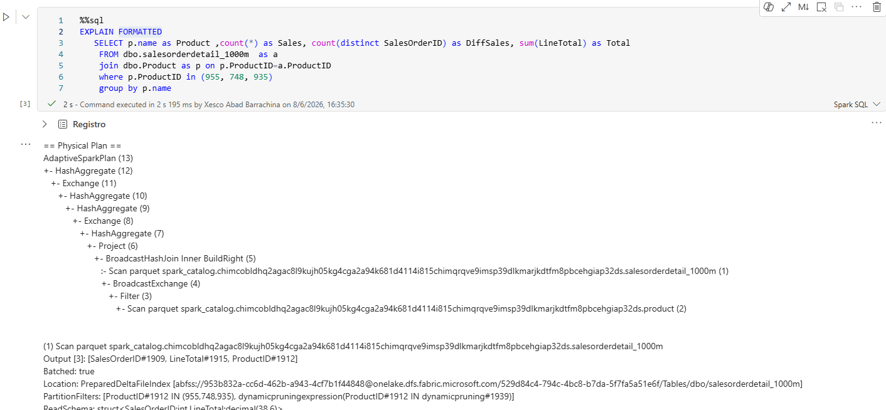
The table below summarizes the key indicators to review in the plan:
| Indicator | Optimal state | Problematic state | Description |
|---|---|---|---|
| Scan Parquet | Few columns read | Many unnecessary columns | Physical read from Delta/Parquet files |
| PartitionFilters | Present | Absent | Eliminates entire partitions before reading |
| PushedFilters | Present | Absent | Filters pushed to storage to reduce data read |
| Join type | BroadcastHashJoin | SortMergeJoin | Method used to join tables |
| Exchange | Few | Many | Shuffles: data movement between executors |
| ReadSchema | Few columns | Many columns | Columns actually read from storage |
| AdaptiveSparkPlan | Yes | No | Indicates whether AQE is active and optimizing the plan at runtime |
COMPUTE STATISTICS
In Delta, statistics are updated automatically. However, if the execution plan shows that a previously defined partition is not being applied correctly, you can force a recalculation with:
ANALYZE TABLE demo_rendimiento_delta.dbo.salesorderdetail_1000m
COMPUTE STATISTICS;
This command has less impact than
UPDATE STATISTICSin SQL Server, but it can resolve occasional inconsistencies in the Spark optimizer.
Environment setup in Microsoft Fabric
Every new project in Microsoft Fabric should start by creating a dedicated Environment. This object centralizes the libraries, functions and execution parameters for the project.
To create one: New item → Environment.
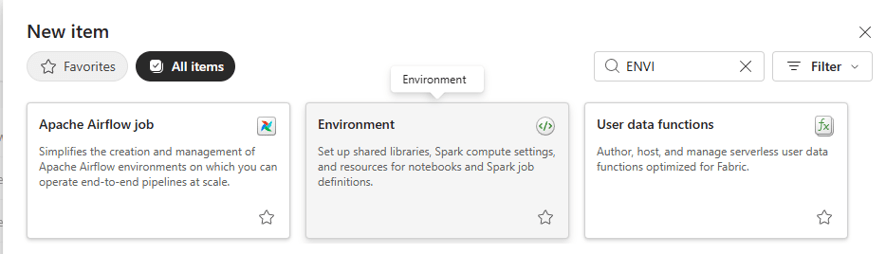
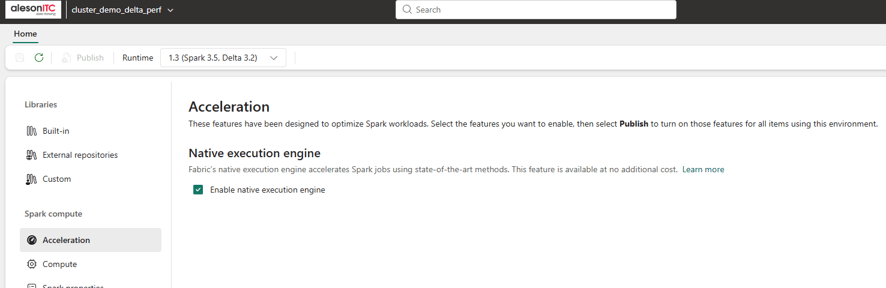
Once created, navigate to the Acceleration section and enable the Native Execution Engine.
What is the Native Execution Engine
By default, Spark executes all operations through the JVM:
Query → Catalyst Optimizer → JVM Spark Engine → Parquet / Delta
With the Native Execution Engine enabled, certain operations are offloaded to a native engine written in C++, based on Apache Velox:
Query → Catalyst Optimizer → Native Engine (C++) → Parquet / Delta
This engine is optimized for analytical SQL queries on large tables (> 100 million rows), particularly aggregation operations:
GROUP BYSUM/AVGCOUNT/COUNT DISTINCT
When not to use the Native Execution Engine: in pipelines with custom Python logic, the engine must leave the native environment and fall back to the JVM, introducing overhead. The following cases are negatively affected:
- Python UDFs
- Pandas UDFs
- Custom Python code
Measured results
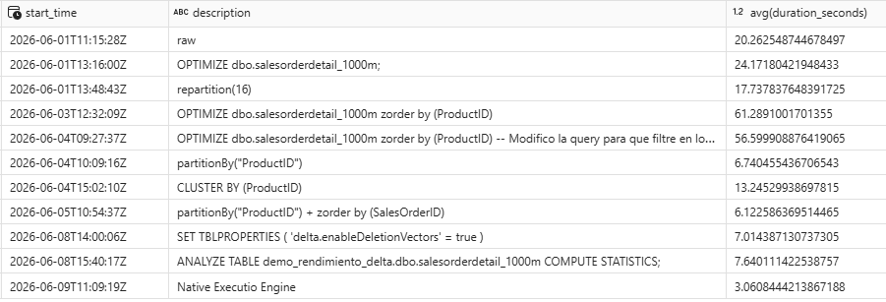
After enabling the Native Execution Engine on a query previously run with clusterBy(ProductID), the results were as follows:
| Configuration | Execution time |
|---|---|
clusterBy(ProductID) (without NEE) | 6.12 seconds |
| Native Execution Engine enabled | 3.06 seconds |
A 50% reduction in response time without changing a single line of business logic.
Conclusion
The techniques covered throughout this series — partitioning, clustering, Deletion Vectors, execution plans and the Native Execution Engine — form the toolkit we apply in real Microsoft Fabric projects to reduce query times and optimize SKU consumption. Less compute capacity required translates directly into lower costs for organizations.
If you know of any additional tools or have questions about any of the topics covered, feel free to leave a comment.
Need help optimizing your Delta tables in Microsoft Fabric?
Applying these configurations in isolation delivers noticeable gains, but the greatest performance improvement — and cost reduction — comes when they are part of a well-designed data architecture from the start.
At Aleson ITC we help organizations implement and optimize Microsoft Fabric and Data Analytics projects on Azure, from Delta table modeling to production-ready high-performance data pipelines.
If your team is experiencing slow queries, high Fabric capacity consumption or wants to migrate an existing Databricks architecture to the Microsoft ecosystem, we can help you find the most efficient path forward.
FAQ — Frequently asked questions about Delta table optimization in Microsoft Fabric
What are Deletion Vectors in Delta Lake and when should you enable them? Deletion Vectors are a Delta table property that records deletes logically without rewriting the original Parquet files. They are especially useful when frequent DELETE or MERGE operations are performed on large tables, as they avoid the cost of full file rewrites. Enabled via ALTER TABLE ... SET TBLPROPERTIES ('delta.enableDeletionVectors' = true).
How do you view the execution plan of a query in Microsoft Fabric / Spark? Adding EXPLAIN FORMATTED before any SQL query returns the full logical and physical plan. The most important indicators are PartitionFilters (partition pruning), PushedFilters (filters pushed to storage) and the join type used (BroadcastHashJoin is more efficient than SortMergeJoin).
What is the Native Execution Engine in Microsoft Fabric and what does it improve? It is a native execution engine based on C++ and Apache Velox that replaces the JVM-based Spark engine for certain analytical operations. It delivers significant gains on aggregations (GROUP BY, SUM, COUNT) over tables with more than 100 million rows. In our own tests it reduced execution time from 6.12 to 3.06 seconds on the same query.
When should you NOT use the Native Execution Engine in Fabric? The Native Execution Engine is not beneficial — and may even add overhead — when the pipeline contains Python UDFs, Pandas UDFs or custom Python logic, as these operations force the engine to leave the native environment and return to the Spark JVM.
What is the difference between COMPUTE STATISTICS in Delta and UPDATE STATISTICS in SQL Server? Both update the statistics used by the optimizer to generate efficient execution plans. In Delta, statistics are recalculated automatically, so ANALYZE TABLE ... COMPUTE STATISTICS is only necessary when the optimizer fails to correctly apply defined partition filters. Its impact is lower than in SQL Server, where stale statistics are a frequent cause of suboptimal plans.
How can you reduce SKU consumption in Microsoft Fabric through Delta optimization? By combining proper partitioning (partitionBy or clusterBy), Deletion Vectors to avoid unnecessary rewrites, the Native Execution Engine for analytical queries and regular execution plan reviews, it is possible to significantly reduce compute time per query. Less execution time means lower Fabric capacity consumption and therefore lower operational costs.
If you need an expert review of your architecture, the Aleson ITC Data Analytics team can help.

Business Intelligence Expert Consultant. Specialising in creation of Data Warehouse, Fabric, Analysis Services, Databricks, Power BI, SSIS and SSRS.